LinkedIn Ads Scheduling & Dayparting Optimization
Schedule LinkedIn ads by hour, day, and timezone so budget only runs when your buyers are active. Stop paying for impressions at 3am and put that ad spend on the hours that convert.
The easiest way to
save up to 40% of your ad spend, as reported by customers.
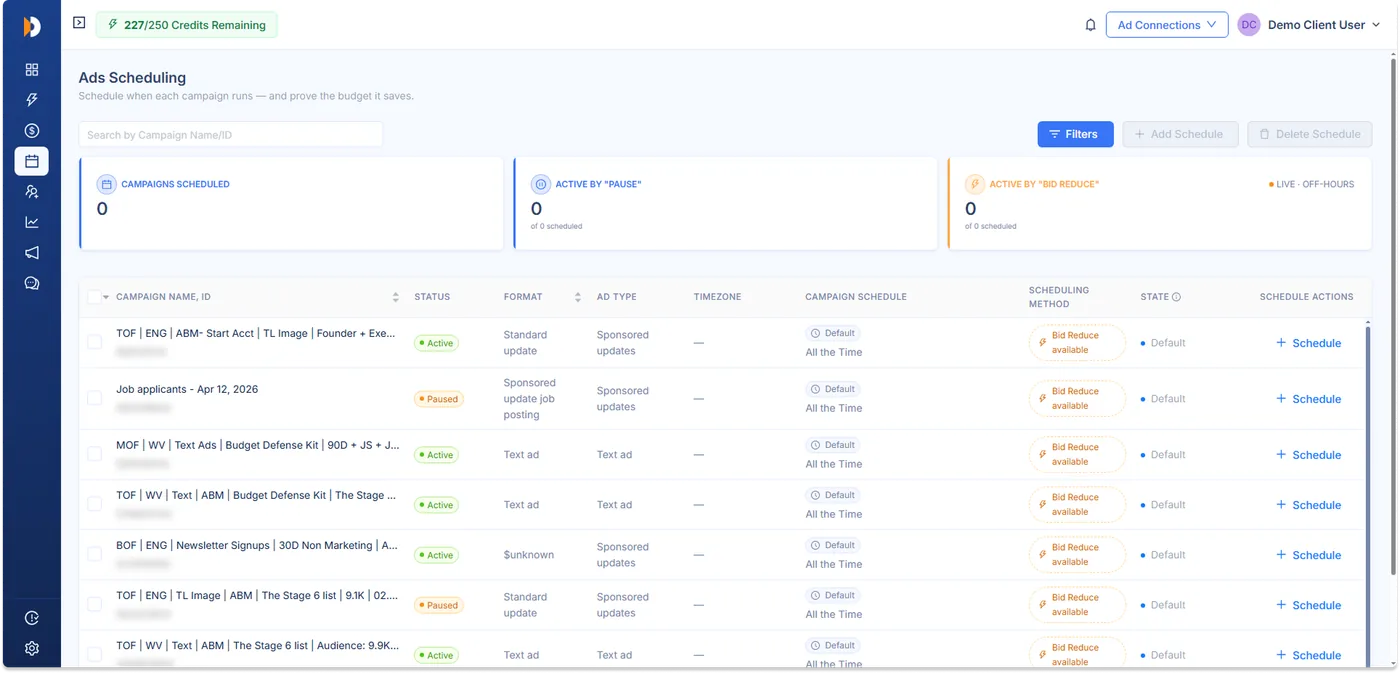
Set your schedule in minutes.










Your LinkedIn campaigns waste budget in ways you can't see
Campaigns run continuously by default. Without a way to schedule ads around when audience is most likely to engage, your budget spreads evenly across every hour, including the ones that never produce a single conversion.
High-performing hours don't get prioritized
Your best windows get the same budget as your dead ones. The hours your target audience actually clicks compete for the same ad spend as 3am.
Global campaigns waste spend across time zones
One schedule runs all day everywhere. You pay to reach people while they sleep in time zones you don't even sell into.
Budget gets distributed evenly instead of strategically
Even pacing spreads spend thin. Your daily budget can exhaust on low-intent windows before the high-intent days and times arrive.
Ads run during low-intent hours
Your campaign serves around the clock by default. So budget goes to 2am Saturday impressions when the buyers you want are only online 9am Tuesday.
You find out after the spend is gone, when you export the report.
Run LinkedIn ads only during peak hours
Custom ad scheduling puts you in control of delivery timing. Set the rules once and your campaigns run on your schedule, not around the clock.
Schedule campaigns by hour, day, and timezone
Custom ad scheduling down to the hour. Set start and end times per weekday and pick the timezone that matches your audience, so ads run at the specific times your buyers are active.
Start Your 30-Day Free Trial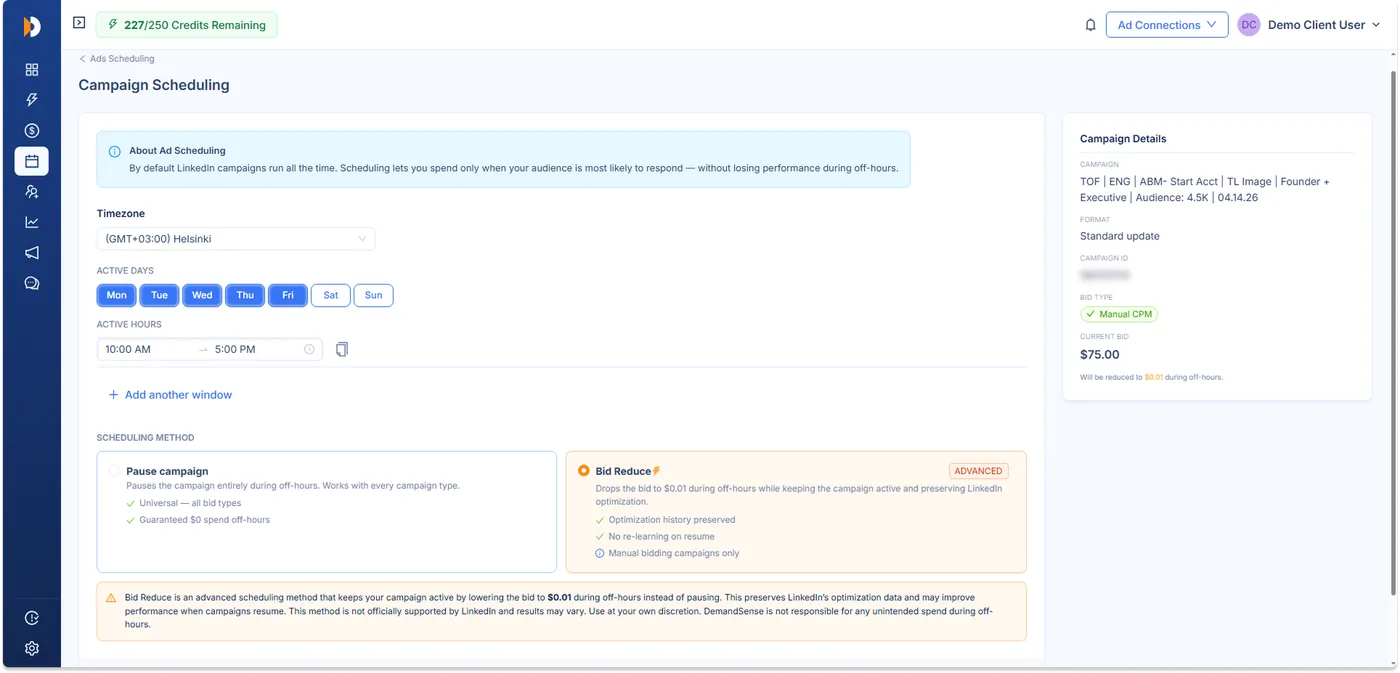
Automatically pause campaigns during low-intent periods
Ads stop when your audience isn't active and resume on schedule. No logging into Campaign Manager every hour to flip campaigns on and off by hand.
Start Your 30-Day Free Trial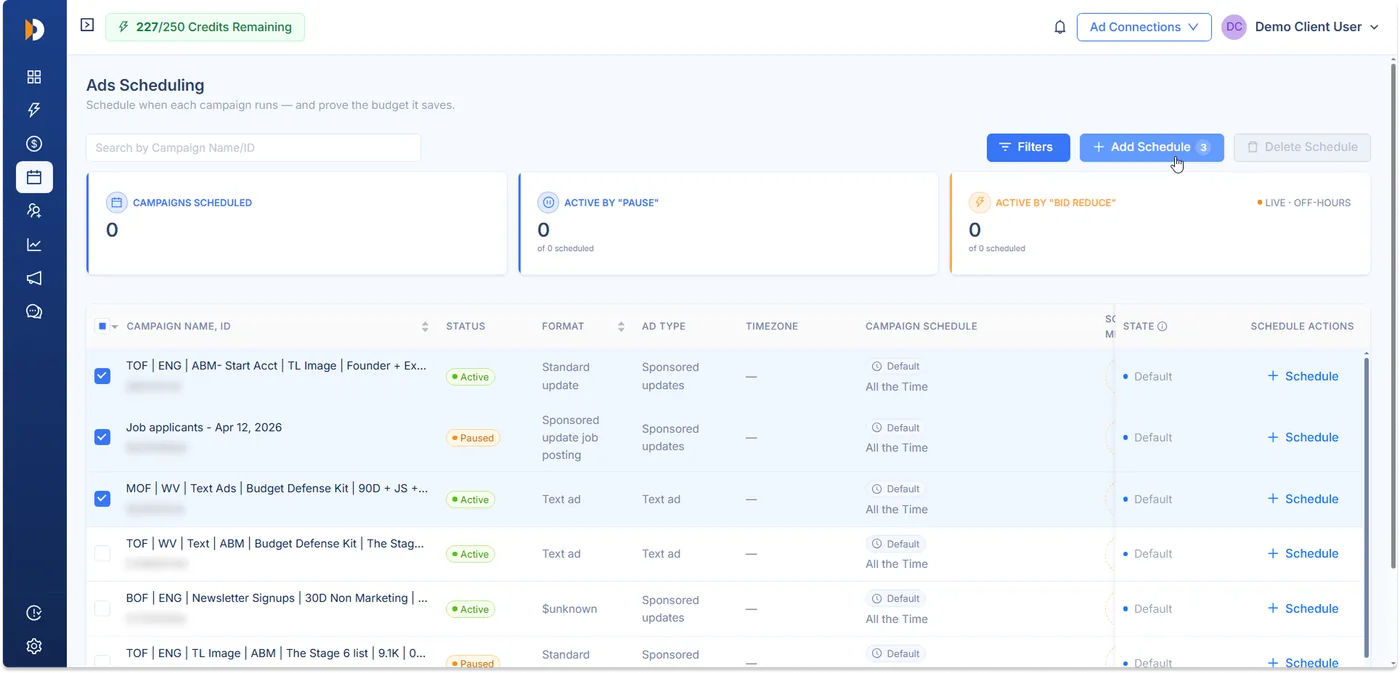
Reduce bids during low-conversion windows
For eligible manual-bid campaigns, lower the bid in soft windows instead of pausing, so you stay present without overpaying. (Advanced option; see the FAQ for details.)
Start Your 30-Day Free Trial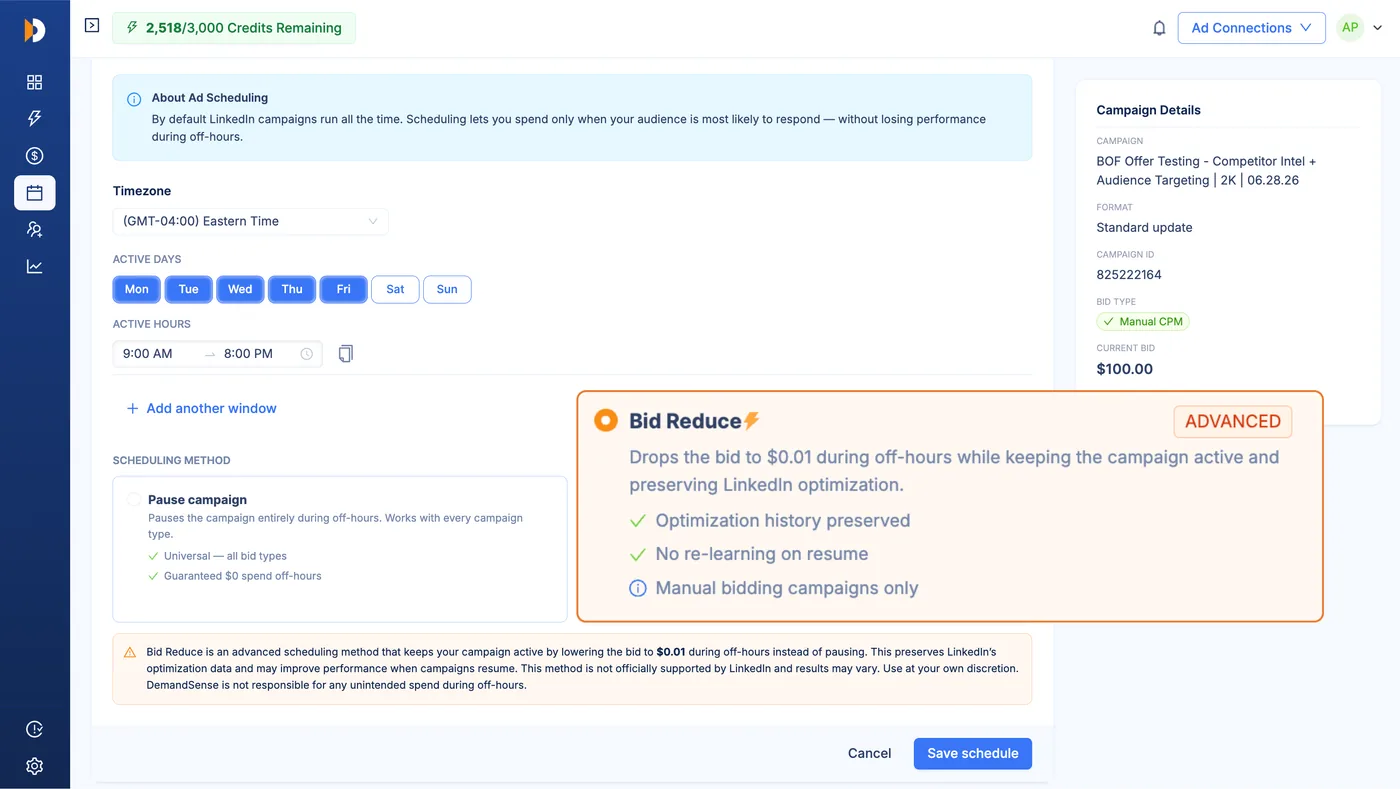
Prioritize high-performing delivery windows
Concentrate budget on the days and times that actually drive pipeline. The same spend works harder when it lands in the windows that convert.
Start Your 30-Day Free Trial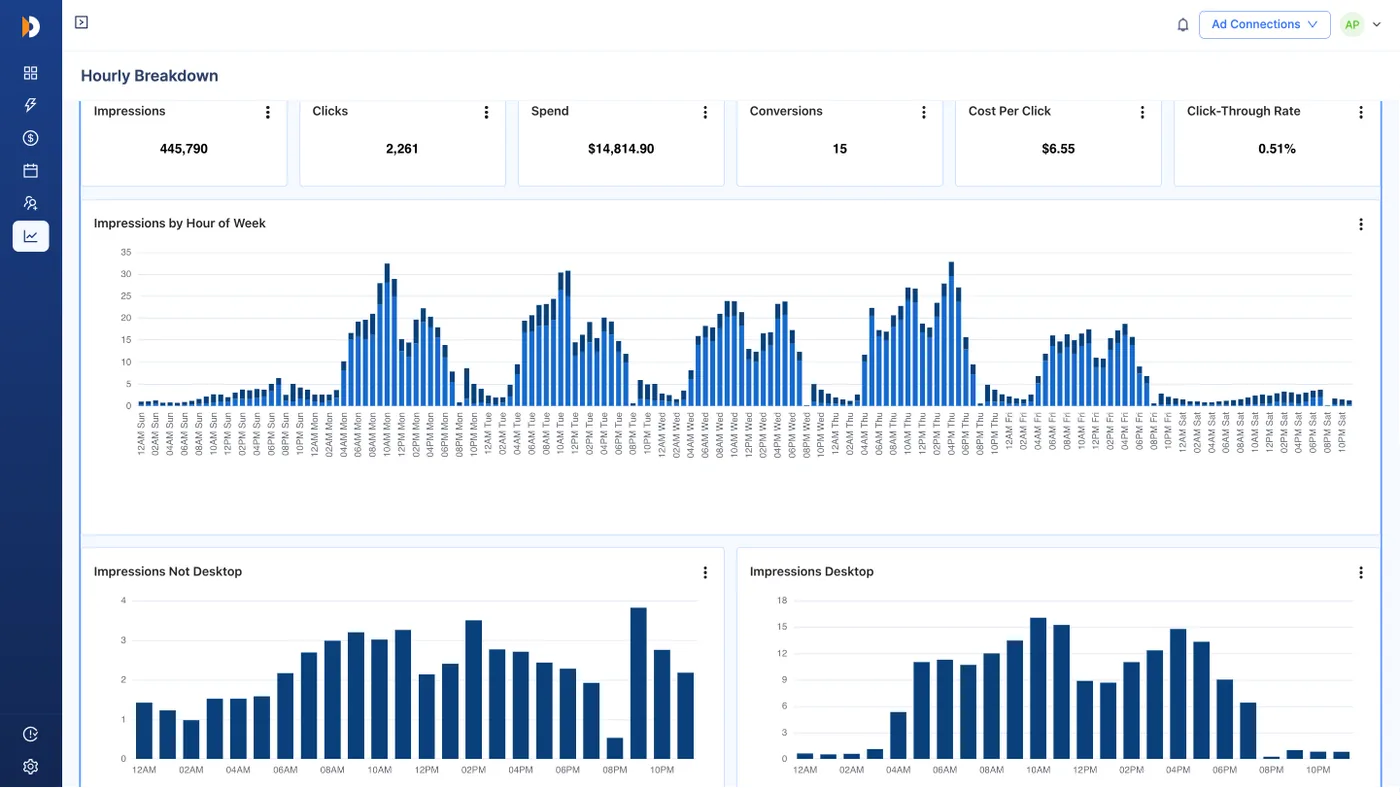
Set your LinkedIn ads scheduling rules once.
DemandSense automates delivery timing.
STEP 1
Configure schedules
Set hours, days, and timezones per campaign, or apply one schedule to multiple campaigns at once with bulk scheduling.
STEP 2
Activate scheduling
Turn the rules on and delivery follows them automatically, with no manual pausing.
STEP 3
Pause low-intent delivery
Ads stop during the windows you marked low-value and resume when your schedule says go.
STEP 4
Optimize across time zones
Align delivery to where your audience actually is, so spend follows your buyers instead of the clock.
STEP 5
Review delivery timelines
Check what ran when, see your estimated savings, and refine the schedule as you learn.
Scheduling syncs within 24 hours of saving.
Identify the best times to run LinkedIn ads
See how your ads perform by time before you set a single rule. The hourly breakdown shows you exactly when your audience engages, so your LinkedIn ads dayparting is built on your own data, not generic best-practice advice about the best times to run LinkedIn ads.
How LinkedIn ad scheduling improves delivery efficiency
Every test below ran the same way: turn on DemandSense ad scheduling, then measure delivery efficiency for two weeks. No targeting, creative, or budgets changes. Just running ads when the audience is active.
SaaS Analytics company cuts CPC by 57% and Grows Impressions 44%
Mid-market financial services team drops CPC by 48% and lifts CTR by 8%
Workplace management startup slashes CPM by 49% and reaches 44% more target accounts
B2B Marketing Agency cuts LinkedIn CPC by 56% and nearly doubles reach
When ads run only when your audience is active, costs drop and reach improves. Same budget, more of the right people, just better timing.
How DemandSense scheduling goes beyond native LinkedIn controls
LinkedIn offers basic scheduling capabilities, but modern B2B campaigns require more control over delivery timing, automation, and performance optimization.
| Without DemandSense | With DemandSense |
|---|---|
| Native custom schedule on eligible ad sets only | Schedule by the hour, day, and weekday |
| Set up and update every campaign by hand | Apply one schedule across many campaigns at once |
| One time zone per ad set schedule | Pick the timezone per campaign |
| Ads keep running at full bid in off-hours | Pause delivery in off-hours, or lower the bid on eligible campaigns |
| No view of when your ads actually run | See delivery and performance hour by hour |
| No way to compare days | Compare weekday and weekend delivery side by side |
| Manage timing one campaign at a time | Set scheduling rules once and reuse them |
| Schedules sit static until you change them | Adjust delivery as your performance data comes in |
LinkedIn's native custom schedule covers Sponsored Content ad sets with a lifetime budget. DemandSense adds scheduling at the campaign level, one schedule across many campaigns, automatic pausing and resuming, and an hourly view of when your ads ran. You schedule once and delivery runs on your rules.
Put your LinkedIn ad budget on a schedule that matches your buyers
Connect your LinkedIn account, set your first schedule in minutes, and let DemandSense handle delivery timing from there. Most accounts see lower costs within the first two weeks.
