SaaS Analytics Company cuts CPC by 57% and Grows Impressions 44%
CPC: -57.6%CPM: -45.5%Impressions: +44.2%
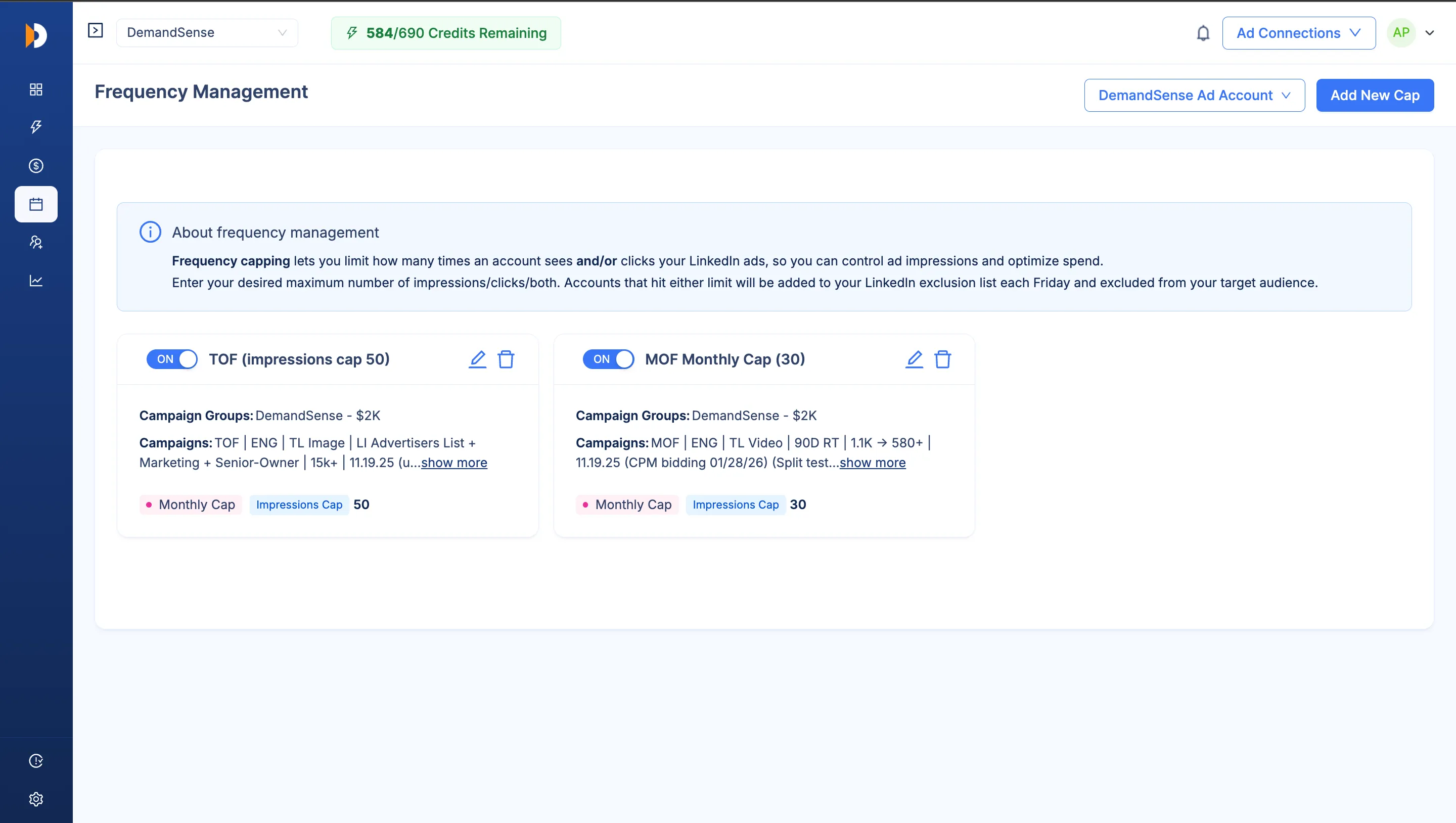
LinkedIn keeps serving 20% of your audience that already saw your ads over and over, while 80% remains unseen. DemandSense sets the ceiling on accounts you reach and pulls exhausted accounts out for you, so your budget concentrates on the full list.
Set once. DemandSense finds who's maxed out and excludes them, automatically.




This isn't a weak audience or bad luck. It's how LinkedIn's delivery algorithm behaves on a finite target list, especially for lead-gen ad formats: it finds a slice of your audience that engages, and it keeps going back to that same slice instead of spreading out. The accounts that haven't seen your ad yet stay unseen. The ones that have get hit again, and again.
Once LinkedIn finds accounts that respond, it leans on them harder instead of testing the rest of your list. A shrinking slice of your target accounts ends up absorbing most of your spend.
LinkedIn's frequency controls only apply to a couple of ad types. Conversation ads and single-image lead-gen ads — the formats most B2B teams actually run — have no native ceiling at all.
Pull frequency numbers yourself, work out who's already seen too much, build an exclusion list, re-upload it into Campaign Manager. Then do it again next week.
Frequency doesn't roll up anywhere you can see it. You find out an account was over-exposed after the month's budget already went to it.
Cap impressions or clicks per company. The moment an account hits its limit, DemandSense excludes it for you. No manual re-upload, no weekly cleanup.
Every account has a point where another impression stops adding anything. Set that ceiling once - by impressions, clicks, or both - and DemandSense holds every campaign to it, whether your list needs a hard stop for the life of the campaign or a fresh limit every month.
Layer a Monthly cap and a Lifetime cap on the same campaign set without a conflict.
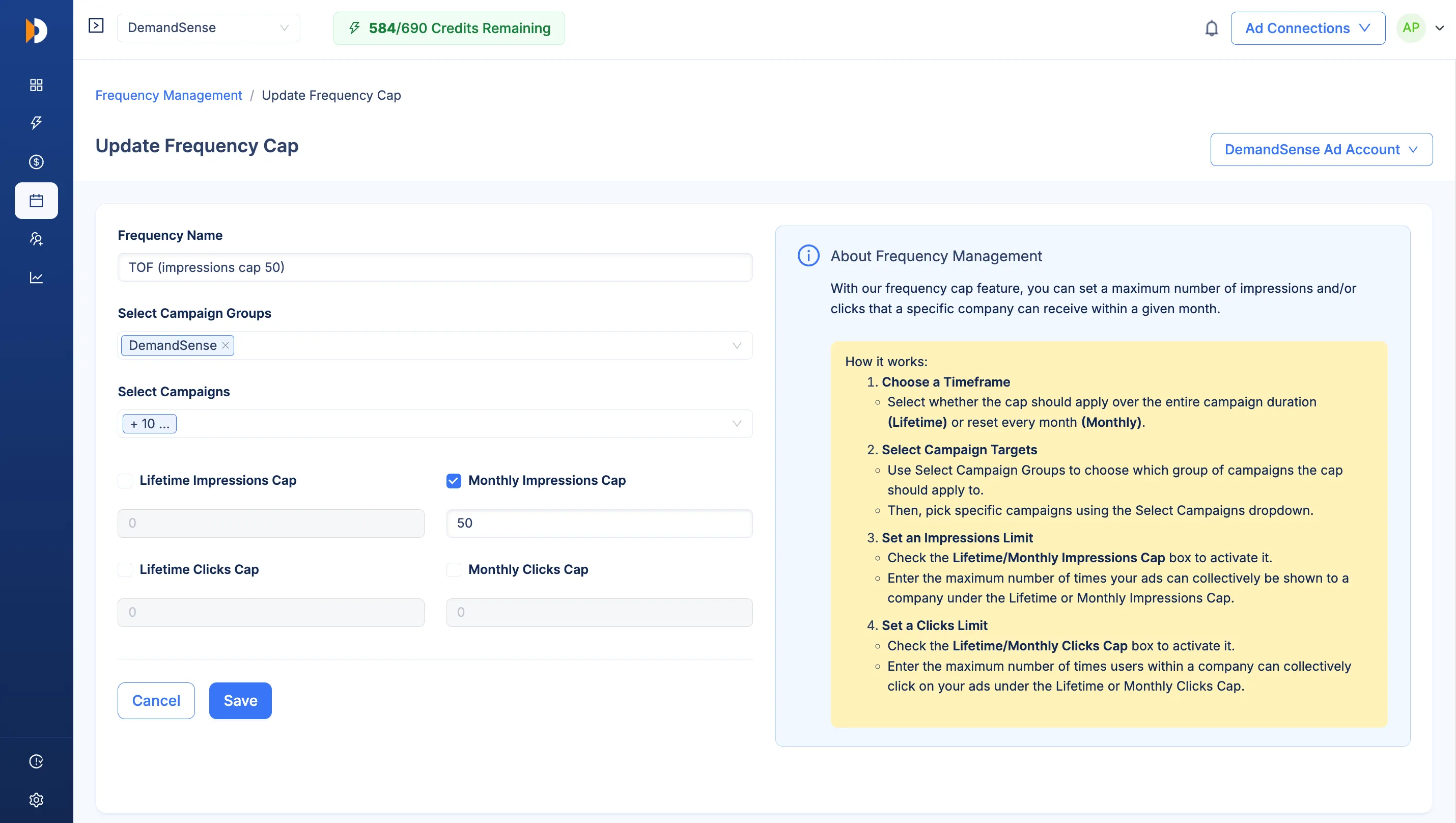
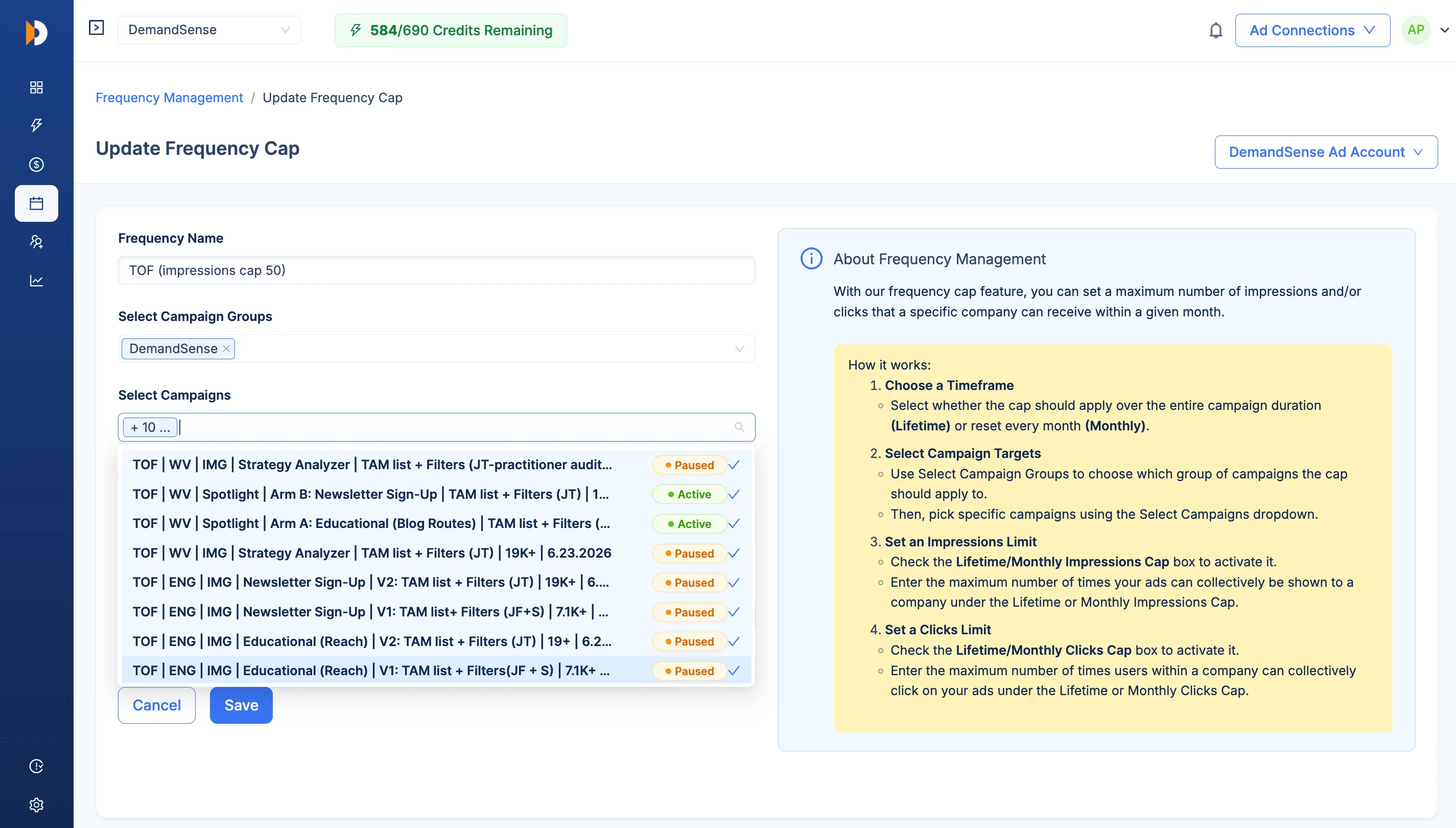
Sometimes it's one campaign running hot against a narrow list. Sometimes the same accounts are getting hammered across every campaign in a group targeting them. DemandSense caps at whichever level matches the problem, so you're not stuck choosing between a fix that's too narrow and one that's too broad.
The manual version of this is a standing weekly chore: pull the numbers, find who's maxed out, rebuild the exclusion list, re-upload it before it goes stale. DemandSense does that step for you - the moment an account hits its cap, it's added to the exclusion, and your existing targeting keeps running untouched around it.
Your targeting stays intact. Only the exclusion gets added.
Scheduling alone lowered CPC and improved distribution by concentrating spend in the hours buyers were active
Aussie Founders
DemandSense user here. Early days, but definitely feel like I'm burning less money.
B2B Strategy & Execution Partner to Aussie Founders
Vim
Linkedin Ad Scheduling of DemandSense is my favorite feature too, and it saves me thousands of $$ every month. I've been using it for 2+ years!
Growth Marketing Lead
BlueStar US
Just wanted to say that I've been using DemandSense for almost a full week, and the early returns are pretty awesome. CPMs are down between 30-40%, impressions are up between 50-100+%, and clicks are up between 30-60%.
Director of Marketing
Project Scale
I'm a HUGE fan of DemandSense… probably reduced my cost per lead by 60% the second I turned it on. It's literally been the difference between a campaign being incredibly successful, or burning a hole in my pocket.
Founder
Aussie Founders
DemandSense user here. Early days, but definitely feel like I'm burning less money.
B2B Strategy & Execution Partner to Aussie Founders
Vim
Linkedin Ad Scheduling of DemandSense is my favorite feature too, and it saves me thousands of $$ every month. I've been using it for 2+ years!
Growth Marketing Lead
BlueStar US
Just wanted to say that I've been using DemandSense for almost a full week, and the early returns are pretty awesome. CPMs are down between 30-40%, impressions are up between 50-100+%, and clicks are up between 30-60%.
Director of Marketing
Project Scale
I'm a HUGE fan of DemandSense… probably reduced my cost per lead by 60% the second I turned it on. It's literally been the difference between a campaign being incredibly successful, or burning a hole in my pocket.
Founder
Set a cap once. DemandSense watches every campaign and excludes any account that's seen enough, so your budget finally reaches the accounts it's been missing — not just the same few it keeps hitting.
