LinkedIn Ads
Tools & Comparisons
Best LinkedIn Automation Tools for B2B Marketing and Ads
Compare LinkedIn automation tools for B2B marketing and ads: what each automates, how it connects to LinkedIn, which CRMs it supports, and what it costs.
LinkedIn Ads
Right now, some of your potential clients don’t know you exist. Others don’t know they are dealing with a problem your product can solve. Some don’t even know they have a problem in the first place. And if you try to sell to them today, they will scroll past the ads.
With LinkedIn document ads, you can make a positive first impression. You educate your audience with valuable content to help them understand the challenges they are facing and how to solve them. With time, they learn to trust your brand, and when they are ready to buy, they will remember you as the expert.
And the best part is you already have the resources. All those blogs, ebooks, benchmark reports, and case studies you spent a lot of time writing are your most valuable assets. Instead of letting them sit idly on your website waiting to be discovered, share them on LinkedIn with your audience.
The mistake many marketers make is expecting document ads to generate leads immediately. We’ve seen marketers kill document ad campaigns because of low CTR and spend more on other LinkedIn ad formats that get high clicks, probably from the wrong audience. But what they don’t understand is that document ads are great for building demand.
In this article, we will cover everything you need to know about LinkedIn document ads, including examples, when to use them, how to measure performance, and how they compare to single image ads (marketers’ favorite).
LinkedIn document ads are a type of Sponsored Content that allows advertisers to promote documents (case studies, benchmark reports, or blogs) directly within the LinkedIn feed. This lets the audience read and download the content without leaving LinkedIn. That in-feed experience is what sets it apart from other formats like single image ads.
With document ads, you can:
Pushing a demo too early on LinkedIn can be tough, but getting someone to engage with high-value content is a much lower-friction step that many B2B buyers are willing to take.
Document ads can be gated or ungated. With gated content, readers must complete a Lead Gen Form before accessing the full document. But with ungated content, users can read and download the content without filling out forms.
The choice between the two depends on what you hope to achieve. Do you want more reach or more leads? If you want to build brand awareness and boost engagement, then ungated content is the better option. But if you want to capture quality leads, use gated content.
Ungated content also works best for TOFU audiences. These are cold audiences who have no reason to trust you with their personal information. Use educational content like blogs to build their trust before asking them to fill out forms.
Gated document ads, on the other hand, are more suitable for MOFU and BOFU campaigns. These are audiences who already know who you are and may be open to filling out forms. Nurture them with content they cannot get anywhere else, like benchmark reports, ABM playbooks, and pricing guides.
If you are not sure whether to gate or ungate your documents, you can experiment with both. Start with gated content and see if the target audience is willing to give their information for it. The form fills should generate quality leads. But if the lead volume is low, you can switch the document to ungated to increase organic reach.
Here are some tips you can use to give users a better experience with your document ads:
The introductory text gives readers a brief overview of what the document is all about and why they should read it. Be very clear on the insights they will get from the document to make them want to know more. For example:
| Type | Intro text | Analysis |
|---|---|---|
| Weak | Excited to share our latest report on B2B marketing. Download it to learn how top companies are revolutionizing B2B marketing. | It’s weak because at 126 characters, it fails to tell the audience specifically why they should read the report. It’s too general. And instead of making it about the report, it should have focused on the audience, their problems, and their needs. |
| Strong | Top category ads repeat winning patterns, and this report shows which ones matter, how your ads compare + what to improve first. | This is better because it promises to help the reader with a specific problem — how to write better ads. |
LinkedIn recommends keeping intro text at 150 characters or fewer, as anything past that is truncated on most devices. If you go over 150 characters, you will have to pay for clicks every time a user clicks on ‘see more.’
This is the first thing people notice, so make sure it is visually appealing. You should also include the benefit here so the audience knows what they will get from the document.
Whether the document is gated or ungated, users should learn something useful in the first few pages. Most people have a short attention span, and if you waste the first few pages on tables of contents, explaining methodology, or introducing your company, they will zone out.
The first few pages should contain your most valuable insights from the document, especially with gated content. If users don’t find anything useful in the preview pages, they will never fill out the Lead Gen Forms.
Most people use LinkedIn on their phones, so you should design ads that fit both desktops and phones. Designs that only work on desktops may not work well on mobile, giving users a bad experience.
You should:
CTAs and URLs only become clickable once the document is read and downloaded. So if you must add them, use soft, low-friction CTAs for ungated content, such as Learn more or Visit our website.
For gated content, you can use stronger CTAs like Book a demo or Unlock document because of the Lead Gen Form.
Here are some examples of document ads for reference:
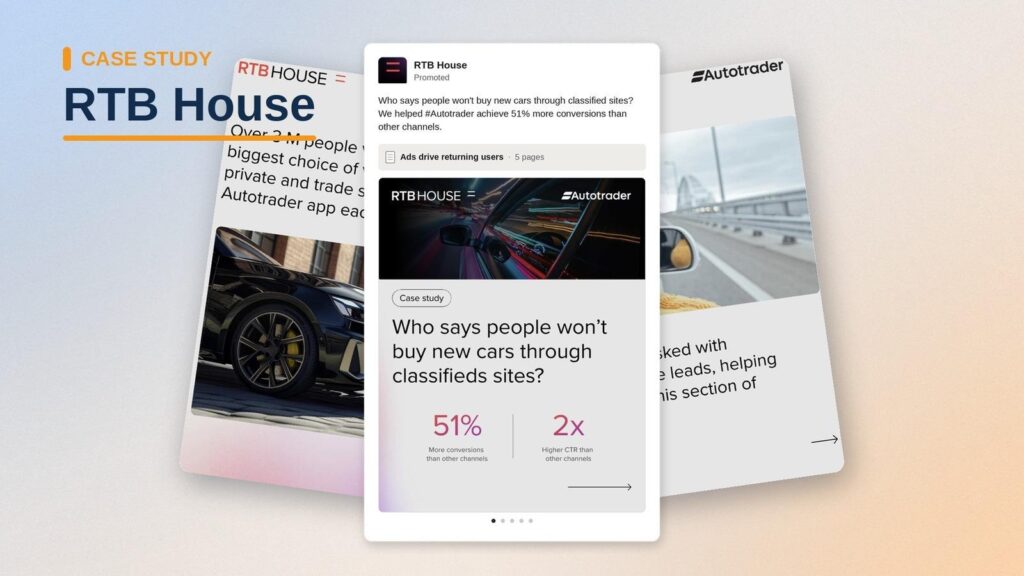
Show prospects how you solved a customer’s problem to build trust with a warm audience.
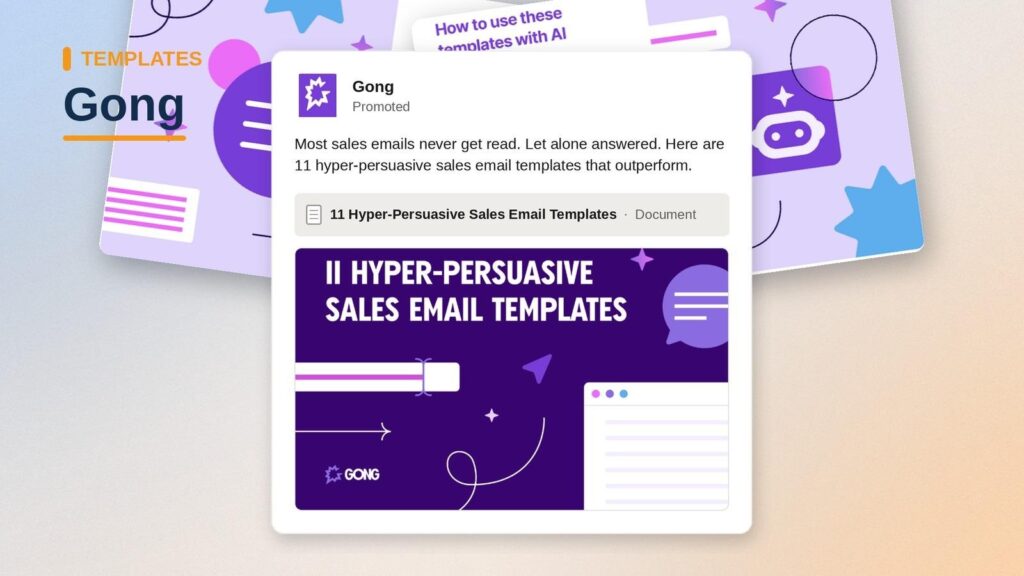
Give prospects something they can use immediately while introducing them to your brand.
Teach buyers how to solve a problem and position your company as the expert.
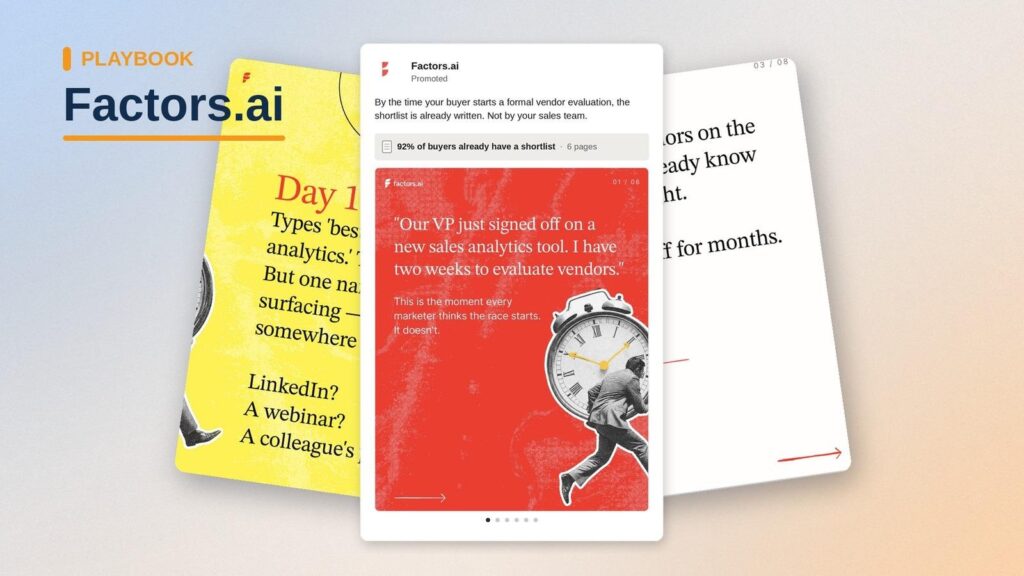
Share original research or market trends to educate buyers and introduce them to your brand.
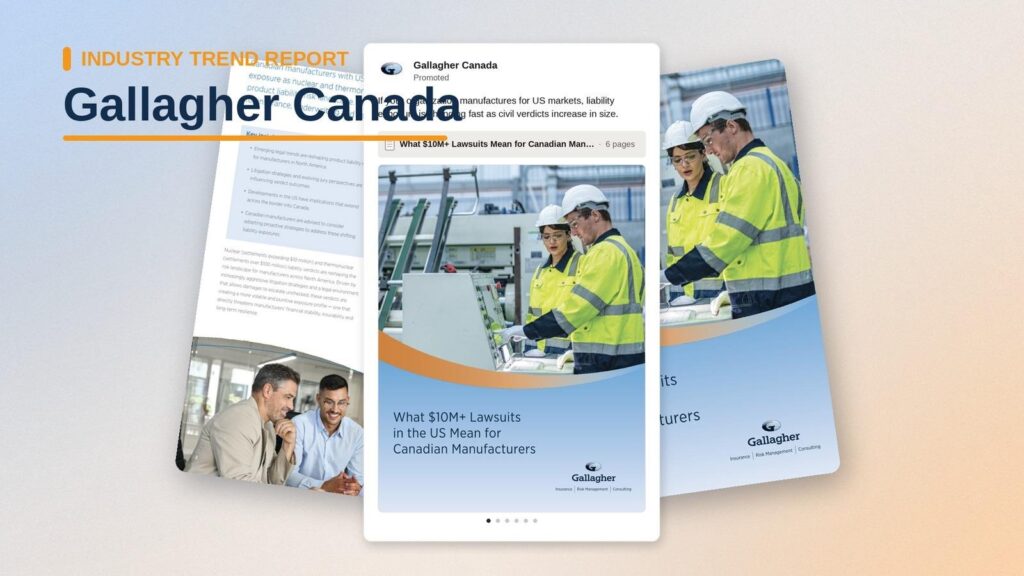
Help buyers identify gaps or assess whether they have a problem worth solving.
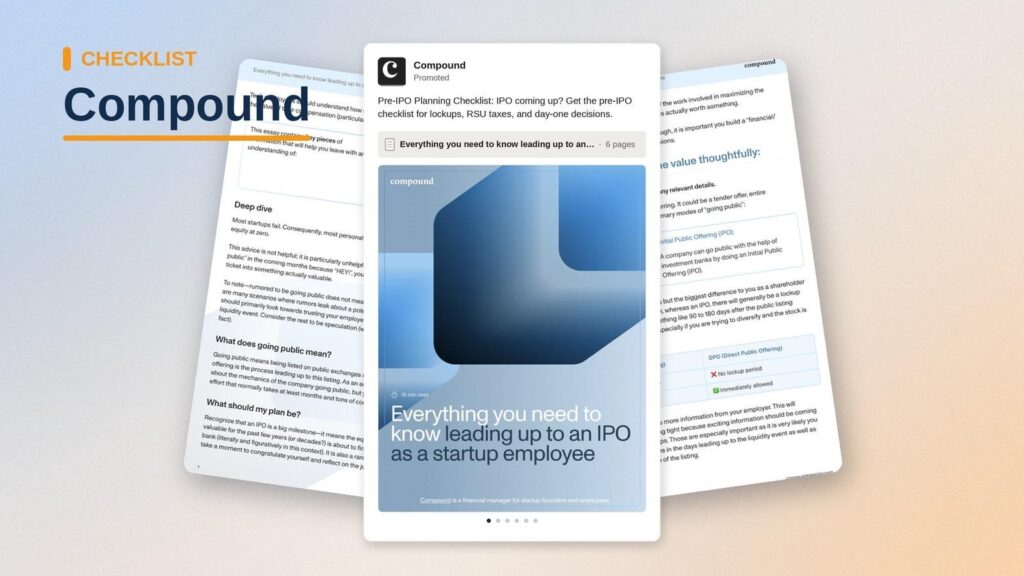
Most marketers prefer single image ads over document ads because they are familiar and easy to produce. The results are also easier to measure. But neither format is better than the other. They serve different purposes and should not be judged using the same metrics.
When you want to promote content like case studies, guides, and ABM playbooks, use document ads to deliver the documents directly within the LinkedIn feed, instead of using single image ads that send readers back to the website for the same content.
But this does not mean you should abandon single image ads completely. You should use both formats simultaneously. Use single image ads to spark interest, then use document ads to nurture and educate the audience.
Here is a summary of how the two ad formats compare:
| Factor | LinkedIn Document Ads | LinkedIn Single Image Ads |
|---|---|---|
| Objective | Educate buyers and create demand | Drive immediate action |
| Attention span | Longer (readers swipe through multiple pages) | Short (the message must land in seconds) |
| Storytelling | Excellent for explaining complex topics | Message is limited to one visual, a headline, and short intro text |
| Engagement / success metrics | Swipes, page views, downloads, document completion | Clicks, conversions, CTR, CPL |
| Strength | Builds trust before asking for commitment | Generates fast responses from ready buyers |
| Limitation | Requires high-value content to attract the right audience | Hard to explain complex solutions |
| Best for | Promoting reports, ebooks, playbooks, research, and customer stories | Promoting product launches, webinars, and events |
The biggest mistake we see advertisers make is measuring the success of document ads using surface-level metrics only.
If high CTR and clicks are your definition of success, then you’ll likely conclude that your document ad campaigns don’t work. In this section, we will look at the metrics advertisers should focus on and what they tell you about the campaign.
They help advertisers monitor campaign health. They include:
These help you understand how the audience interacted with the content.
If you gated the document with a Lead Gen Form, use these metrics to measure conversion:
With account-level and pipeline metrics, you can see how document ads influence pipeline and prove LinkedIn ROI.
If you are running ABM campaigns, having account-level engagement data makes it easy to trace accounts interacting with your content.
LinkedIn shares ad engagement at company level. DemandSense shows which companies engaged with your document ads, and when those accounts visit your site it identifies the company and, on US traffic, the person. You need that to know whether you are reaching the right people at target accounts.
Once you have the company name, industry, job title, and seniority of your readers, these are the metrics you should focus on:
A high CTR tells you people opened the document, but not whether they read or loved the content. Likewise, a lower CTR does not necessarily mean the campaign failed. Evaluating campaign success on CTR alone can be misleading. Instead, pair CTR with engagement metrics like downloads, displays, or document completion rate to get a clear picture of how campaigns are performing.
This can be tempting, but when those cheap leads never convert to clients, you will have wasted the spend all the same.
Document ads are usually used to educate buyers who are not ready to convert immediately. So when you optimize for lead volume, you have to go broad with targeting and generalize content to accommodate everybody else. As a result, your content will attract the wrong audience.
Even though users don’t fill out Lead Gen Forms, it does not mean they are not interested in your content. Do not ignore the downloads, document completions, and website visits you get from ungated content. These are still strong buying signals.
When your LinkedIn ad metrics and CRM exist separately, it’s hard to tell if campaigns are influencing pipeline and revenue. But when you connect the two, you will be able to trace accounts, see the ones that were influenced by LinkedIn campaigns, and see the campaigns that are working.
B2B buying decisions involve multiple stakeholders, and when running ABM campaigns, you should ensure the campaigns reach most members of the buying committee. Without account-level engagement data, you will never know how the buying committee engages with your ads.
LinkedIn Campaign Manager can only tell you the clicks, impressions, and total downloads on your document, but it can’t identify the companies that interacted with your ads by name, the actions they took after reading the document, or whether they progressed into pipeline.
DemandSense is a platform for the marketer who runs LinkedIn Ads in a small B2B team. It puts three things in one place that usually live in three separate tools: attribution, optimization, and website visitor profiling. On top of that sits an MCP server. For document ads, that means you can connect the ad data to your CRM and see how campaigns influence pipeline and revenue, see which companies engaged with a document even when nobody filled out a form, and see who from those companies then visited your site. You can also see the content that generates more sales-qualified leads and the content that is underperforming.
Ready to measure the impact of your LinkedIn Document Ads beyond clicks? Try DemandSense on your own campaigns, free for 30 days — no card needed.
You can use PDF, DOC, DOCX, PPT, and PPTX. But PDFs are the recommended format, because users download documents as PDFs regardless of the original format, and converting documents to PDFs affects the quality of the original doc.
Yes, they are good for lead generation. You can gate high-value content like case studies with Lead Gen Forms and get quality leads when prospects complete the form. Whether you gate the content or not, document ads make it easy for B2B businesses to educate and build trust with their audience. Most of these prospects turn into leads in the long run.
It depends on what you want to achieve with the campaign and the funnel stage of the target audience. If your goal is to generate leads, use gated document ads. And when you are targeting cold audiences (TOFU) and need more reach, it’s better to promote the content ungated.
They include industry benchmarks, research reports, case studies, buyer’s guides, ROI calculators, checklists, whitepapers, and blogs.
When documents are ungated, LinkedIn users can preview, read, and download the document from their feed without completing Lead Gen Forms or leaving the platform. This low-friction experience is what sets LinkedIn document ads apart from other ad formats.
Book a personalized demo and discover how we can transform your B2B marketing.
See a quick demo videoLinkedIn Ads
Tools & Comparisons
Compare LinkedIn automation tools for B2B marketing and ads: what each automates, how it connects to LinkedIn, which CRMs it supports, and what it costs.
LinkedIn Ads
How to build a B2B target audience profile for LinkedIn Ads: the ICP, the buying group, the data that defines them, and how to turn it into campaigns.
LinkedIn Ads
LinkedIn Matched Audiences often match less than you expect. How match rates work, why lists stall under 300, and what to fix before you launch.
Get expert insights and strategies delivered to your inbox weekly.
