LinkedIn Ads
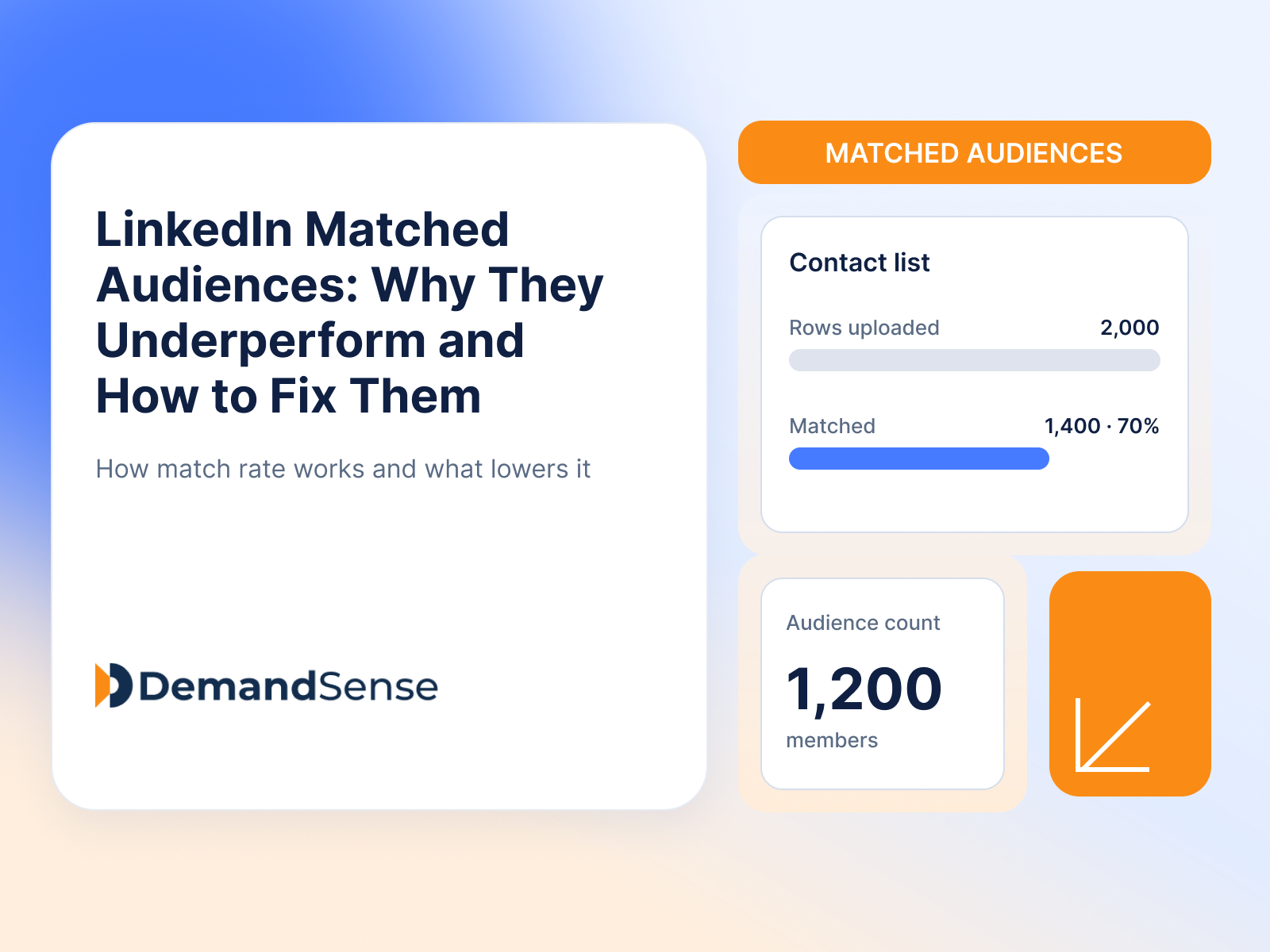
LinkedIn Matched Audiences: Why They Underperform and How to Fix Them
LinkedIn Matched Audiences often match less than you expect. How match rates work, why lists stall under 300, and what to fix before you launch.
LinkedIn Ads
LinkedIn offers plenty of targeting options to help you narrow your audience and make sure your ads reach your ideal customer profile (ICP).
You can build your target audience directly in Campaign Manager using profile-based filters like company, industry, demographics and job experience, which can still leave you with a broad audience.
Alternatively, you can upload lists of the companies and contacts you want to reach and build custom audience segments through LinkedIn’s Matched Audiences.
Knowing how to use both options without making your target audience too narrow or too broad can be challenging.
In this guide, we’ll show you how to combine LinkedIn’s targeting attributes with your own customer data and buying signals to find your target audience and reach the right people.
To find your target audience on LinkedIn:
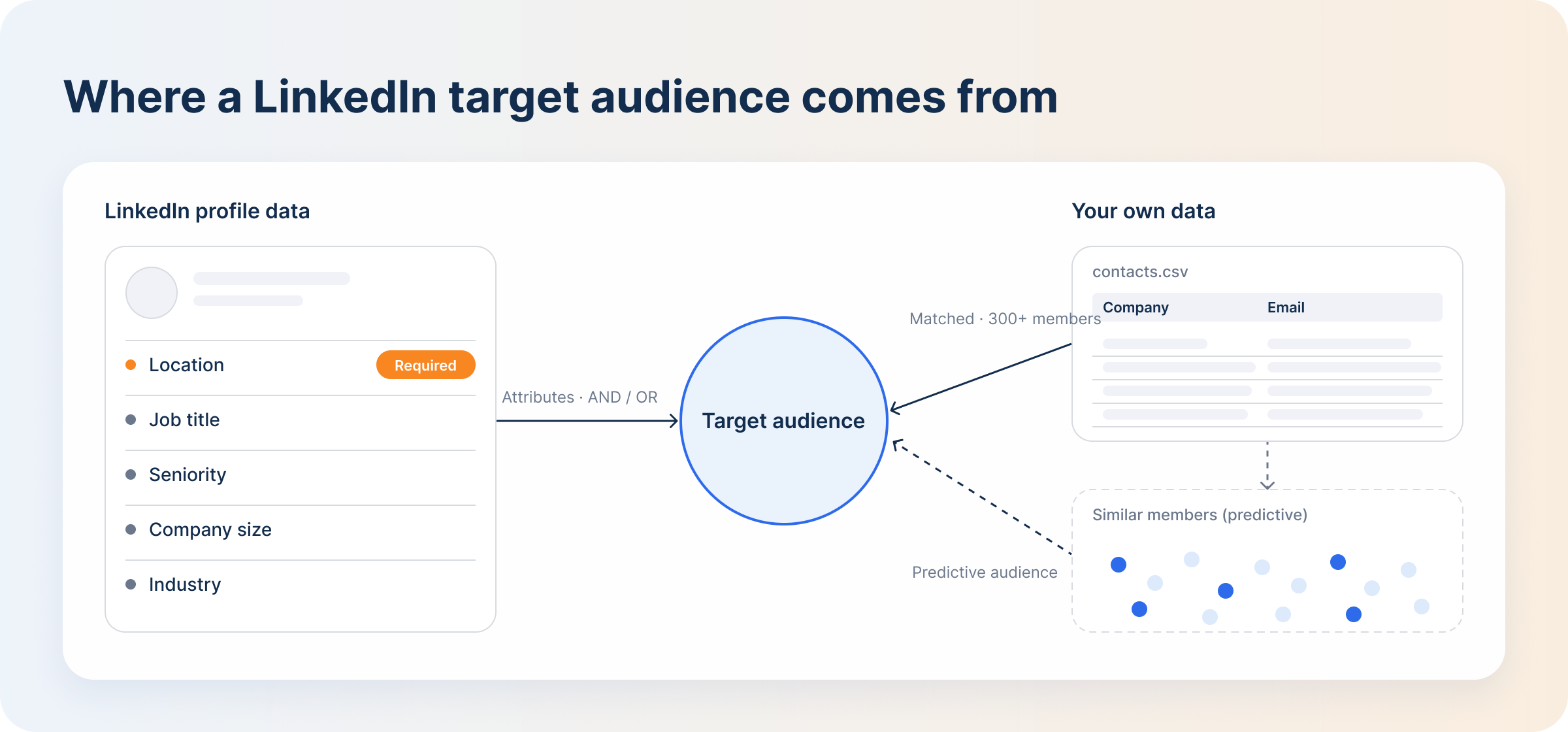
A LinkedIn target audience is the group of people or companies you choose to reach with your LinkedIn ads. You narrow that group using professional attributes like job title, location, company size, industry, language and job experience to reach your ICP.
This makes it easier to segment your audience and target each segment with more relevant messaging that addresses its specific pain points.
LinkedIn is different from other ad platforms because members add their own professional data — job title, seniority, company — which helps marketers zero in on decision-makers within accounts and keep junior employees out of the targeting.
You set up your target audience in Campaign Manager under Audiences. Once you set the location (required) and the profile language of your target audience, you select the attributes you want your audience to have: company, demographics, education, interests and traits, and job experience.
AND/OR logic determines how your selected attributes relate to each other. When you select multiple options within the same category — say, project manager, product manager and brand manager under job titles — LinkedIn applies OR logic and expands your reach to cover all of them.
AND logic narrows your audience. When you select a job function (Marketing) and a seniority (VP, Director), your ads only reach people who match both.
Adding more filters helps you refine targeting, but layering too many attributes leaves you with an audience that is too narrow and limits ad delivery.
LinkedIn gives you four ways to define an audience:
You target members based on their geographic location, using permanent location, recent location, or recent and permanent location together. This is the only mandatory audience setting for LinkedIn advertising.
LinkedIn determines permanent location from the location listed on a member’s profile, and recent location from their IP address during short-term visits.
Selecting a specific location ensures you don’t waste ad spend on impressions and clicks from people outside the regions you serve.
If your audience is spread across regions with different time zones, like the US and Europe, run a separate campaign for each region (as long as each segment is large enough). That way your ads run when those buyers are actually active, instead of running 24/7 to cover every time zone.
LinkedIn retired Lookalike Audiences in February 2024 and replaced them with Predictive Audiences.
Predictive Audiences help you find new prospects who resemble your existing customers. You build one from a data source you already have: a contact list, a conversion, or the people who filled out your Lead Gen Form.
This is a more efficient way to expand your reach than Audience Expansion, which can extend your ads to people with no interest in your business.
Your source needs at least 300 members for the algorithm to work from, and when you choose the audience size for expansion, don’t push it too broad. Upload your best customers as the source to get more accurate matching.
LinkedIn lets you retarget companies and contacts that have already interacted with your business but haven’t converted yet.
Website retargeting requires the Insight Tag to be installed so LinkedIn can track your site visitors. Using it alongside LinkedIn’s Conversions API (server-to-server tracking) helps you capture visitors that browser-based tracking misses.
You can also build custom audiences by uploading CSV files of your company or contact lists, or by syncing your CRM with LinkedIn so the lists populate and update automatically. LinkedIn then matches your list against member profiles. It needs to find at least 300 matched members before you can use the segment in a campaign.
Adding too many filters can make your target audience too narrow and limit ad delivery. Keeping it too broad wastes your LinkedIn ads budget on the wrong accounts.
You need a minimum of 300 members to run a LinkedIn campaign. Depending on your total addressable market, that might be plenty or still too small.
The only way to know whether your targeting is too broad or too narrow is to check Campaign Manager’s forecast: look at the estimated audience size and composition before launch. After launch, use account-level engagement and delivery metrics to decide whether the audience needs to change.
A reliable attribute combination for an ABM campaign is location, a Matched Audience built from a company list, job function and seniority. The audience is narrow enough to only reach decision-makers at the target accounts, and still large enough for LinkedIn to deliver the campaign.
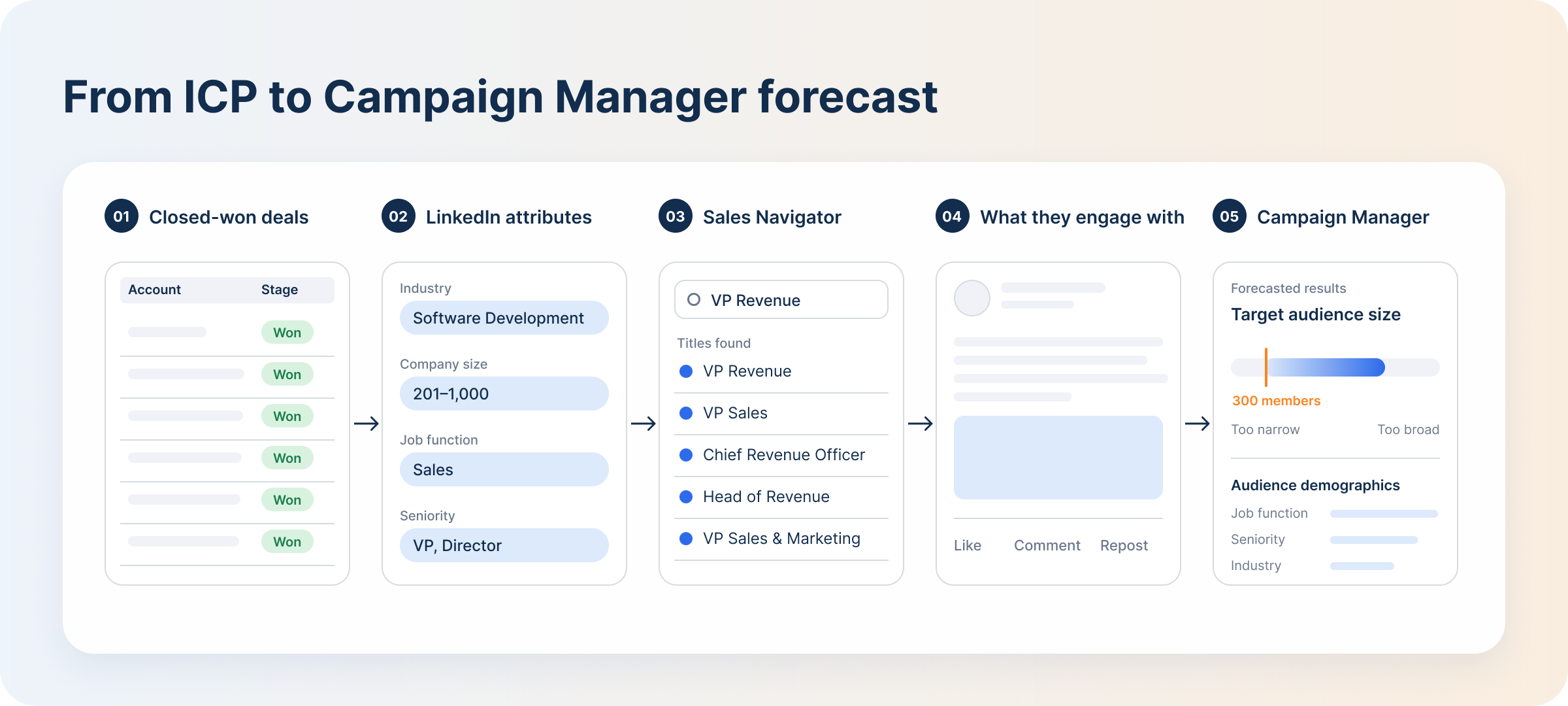
1. Start with your ICP: define your buyer personas (the firmographic data plus the buying committee roles you want to target) based on the characteristics of your best customers.
2. Translate your ICP traits into LinkedIn attributes: find the matching attributes in Campaign Manager, then layer job function and seniority on top so you only reach the stakeholders who matter.
3. Use LinkedIn Search and Sales Navigator to validate that real people carry those titles. If your ICP says “VP of Revenue” but you can’t find those people because they use a different title on LinkedIn, Sales Navigator lets you search by keywords matching your ICP and surfaces all the relevant job titles and functions to target. It also helps you expand, narrow further, or exclude irrelevant roles, industries and functions from your targeting.
4. Study what your target audience engages with: the content they interact with, the problems they discuss and the language they use help you write ad copy they can relate to. Sales Navigator also alerts you to company updates, job changes and new leads that match your saved searches, so you can reach out at the right time and keep your audience segments up to date.
5. Take the shortlist into Campaign Manager: you will see the forecast for your audience size and makeup. Campaign Manager warns you if the audience is still too small or too broad, but it won’t stop you from running the campaign as long as the audience meets the 300-member minimum.
Which continents, countries, states or regions can your sales team actually serve?
If some of your target accounts operate across several countries but you only sell in the US or Europe, select only the locations you can cater to.
Use permanent location for most B2B campaigns, and recent location for conferences and events.
What attributes distinguish your target audience from the crowd? Add company name, company size, industry, job function and seniority, then the specific attributes that narrow things down within those categories. For example, seniority VP AND job function Sales only reaches people who meet both criteria.
Add variants of the job titles that match your ICP so you cover most of your addressable market.
The exclude option helps you keep irrelevant people or accounts out of your audience. For example, target the Marketing job function and exclude email marketing job titles to reach every marketer apart from email marketers.
Is the audience segment too small or too broad, and does it match your ICP? Review the audience demographics in Campaign Manager to see how your audience breaks down by job function, seniority, company and industry, then make adjustments before you launch.
Manually researching your audience through LinkedIn Search or Sales Navigator gives you accurate audience segments because you verify profiles one by one. But it is time-consuming, and the lists go stale fast unless someone remembers to update them regularly.
Connecting your CRM and LinkedIn data reduces the manual work of updating audiences and excluding people who no longer belong in a campaign.
But automation can’t fix a bad ICP or poor CRM data. The system keeps a list updated; it cannot decide whether your definition of a good customer is correct.
The targeting options above help B2B marketers in four ways:
1. ABM campaigns against a named account list
Instead of approximating target accounts with broad LinkedIn filters, start with the warm accounts in your CRM for ABM prospecting. Those accounts have already shown interest in your business and are more likely to convert.
2. ICP-based cold reach
Use native LinkedIn attributes to reach companies and contacts who fit your ICP but are not yet in your CRM. Your customer data tells you which attributes matter, instead of building an audience from generic job titles alone.
3. Retargeting engaged accounts
Website retargeting lets you re-engage accounts that visited your site after seeing your ads but did not convert. Pairing it with website visitor identification shows you which of those accounts fit your ICP and which pages they looked at, so you can retarget them with more relevant messaging.
4. Finding new prospects
Predictive Audiences help you find new prospects similar to your ICP, expanding your reach without relying on broad settings like Audience Expansion.
Manual audience research in Campaign Manager gives you a hypothesis about who might buy. DemandSense shows you who your ads actually reach and which accounts are already showing interest, so you can build more precise audience segments.
Its website visitor identification module, Sensor Pixel, identifies anonymous website visitors at the company and contact level and scores each one against your ICP automatically. That makes it easier to spot and exclude non-ICP accounts from your campaigns, and to push the ICP-fit accounts to LinkedIn as a custom audience.
Through Audience Tuning, you see every company that viewed or engaged with your ads instead of the top-25 company sample Campaign Manager surfaces. You see which accounts your budget actually reaches, then exclude the ones wasting it — a competitor, an existing customer, an active deal — without rebuilding the audience in Campaign Manager. CRM integration excludes customers and open deals automatically on a weekly cycle.
The MCP server, on every plan, answers the question in between from Claude or ChatGPT: which ICP-fit companies saw your ads, visited your site, and still aren’t in your CRM.
Try DemandSense on your own campaigns, free for 30 days — no card needed.
Not directly. There is no pain-point attribute. Interests and traits, groups and skills help you understand what your buyers care about, and your content does the rest: address those specific problems in the ad and the right people will recognize themselves.
No. The Company Followers attribute targets members who follow your own company page, not a competitor’s followers.
You can, however, use the free DemandSense Competitor Analyzer to see the LinkedIn ads your competitors are running, how they frame their product messaging and who they appear to be speaking to, then use those insights to sharpen your own campaign.
No. LinkedIn’s policy prohibits targeting individuals. You can use attributes that describe the audience you want to reach, or upload first-party company or contact data through Matched Audiences to build custom audiences. Either way, the segment needs at least 300 matched members before you can use it in a campaign.
Yes. Marketing and sales must agree on who qualifies as an ideal customer: firmographics, technographics and buyer personas. The difference is scale. Marketing runs campaigns against a large group of people or companies, while sales works one account at a time, so the sales team gets far more specific about its attributes.
Yes. You can save audiences with LinkedIn’s Saved Audiences feature and reuse them across campaigns. But update the lists as prospects move through their buying journey: exclude closed-won and closed-lost deals, retarget mid-intent buyers in consideration campaigns, push high-intent buyers through conversion campaigns like demo requests, and add low-intent buyers to your awareness campaigns.
Review it based on what the campaign is telling you rather than on an arbitrary calendar. An ICP shift, a drop in delivery or engagement data that doesn’t match your ICP are all good reasons to revisit your target audience.
Book a personalized demo and discover how we can transform your B2B marketing.
See a quick demo videoLinkedIn Ads
LinkedIn Matched Audiences often match less than you expect. How match rates work, why lists stall under 300, and what to fix before you launch.
LinkedIn Ads
A complete guide to LinkedIn targeting: every ad targeting option, retargeting and matched audiences, ABM targeting, and how to keep audiences converting.
LinkedIn Ads
Compare LinkedIn Conversation Ads and Message Ads: how each format works, which fits your campaign, and how to measure them beyond opens and clicks.
Get expert insights and strategies delivered to your inbox weekly.
