DemandSense vs Fibbler: Pricing, Use Cases, and Key Differences
DemandSense vs Fibbler compared by the job you are hiring for: use cases, Conversions API, MCP, ad controls, pricing, and what reviewers of both tools say.
Share:
Somebody in your company controls the budget and does not believe LinkedIn is working. Until you can put a number in front of them, that argument comes back every quarter. Fibbler exists to end it, and says so in one line on its homepage: “Give your execs proof paid ads drive revenue.” That is a real job, and they do it well.
It is also the closest tool to DemandSense on the market. The attribution models carry the same three names with near-identical thresholds, both show you the companies that saw your ads without ever clicking, both ship an MCP server, and both trial for 30 days. A comparison that pretends otherwise is not worth your time. What the overlap hides is that the two tools want different things from you after the number lands: one is built to settle the argument, the other to change what happens next. This starts from what they share and works outward to that.
The Short Answer
Fibbler is a LinkedIn Ads attribution tool. It connects paid and organic LinkedIn engagement to deals in HubSpot, Salesforce, Attio or Pipedrive, shows which accounts are warming up, and pushes those signals to Slack, Teams or Clay. Attribution is included on its $89 plan. As of September 2026 it identifies website visitors only at company level and only through its Google Ads or Meta add-on, and it does not send conversions back to LinkedIn.
DemandSense is a LinkedIn ads management platform that reads buyer signals across LinkedIn engagement, site visits and CRM deals. It identifies the companies on your website and scores them against your ICP, then attributes LinkedIn activity to CRM revenue under thresholds you set. It also acts on what it finds: closed-won deals go back to LinkedIn through the Conversions API, budget stops reaching accounts that already closed, and four controls Campaign Manager does not offer run as settings. Every feature is on every plan from $89 a month; the plans differ only in monthly credits.
Choose Fibbler if the job is a proof number for someone who doubts LinkedIn. Choose DemandSense if you want the same attribution, at the same $89, to also do something: feed LinkedIn’s optimisation with real deals, stop spend on accounts that already closed, and show you the accounts on your site before a deal exists.
What Buyers Expect From a LinkedIn Ads Tool in 2026
Buyers of both tools ask for the same things, and their reviews say so whichever tool they ended up with. The list below is what keeps coming up, with a plain answer for each tool.
What buyers ask for
Fibbler
DemandSense
Companies, not clicks: which accounts saw and engaged with the ads, including impressions nobody clicked
Yes
Yes
Decide what “influenced” means yourself
Awareness, Engagement, Intent, plus a Custom model
Awareness, Engagement, Intent, with editable thresholds
A lookback longer than LinkedIn’s
12 months, with 12 to 24 months of history
3, 6 or 12 months
Organic LinkedIn counted alongside paid
Yes, with its own view
Yes, on each account’s timeline and in the presets
Know who is on the website before they fill in a form
Company level, through the Google Ads or Meta add-on
Companies globally, people for US traffic, scored against your ICP
Send closed deals back to LinkedIn so the algorithm learns from buyers, not form-fills
No
Yes, LinkedIn Conversions API, with deal value
Ask the data a question from Claude or ChatGPT
Yes, read-only MCP on Unlimited and Agency
Yes, read-only MCP on every plan
Tell a salesperson when an account warms up, without a login
Slack, Teams, Clay, Zapier, n8n, Make
Webhook push and in-app panels
Change the campaign from inside the tool: hours, frequency, exclusions, budget
Scheduling by hour and day, frequency cap by company, ICP-based audience tuning, monthly budget ceiling
Two rows deserve a note. The Conversions API row is the largest functional gap between the two tools, and a recent one: the DemandSense integration went live on 3 September 2026. The alerting row is the other to read closely, because Fibbler’s Signals reach Slack and Teams directly.
Where the Two Tools Are the Same
Fibbler’s attribution models are Awareness, Engagement and Intent, plus a Custom model where you set your own thresholds, over a twelve-month window. DemandSense uses Awareness, Engagement and Intent, with editable thresholds, over three, six or twelve months. The default thresholds land in the same places: an account counts as aware after seven paid impressions or three organic ones in both tools.
Both read paid and organic company engagement at account level, which is what lets either tool show you accounts that saw your ads and never clicked. Both count organic engagement in their influence thresholds. Both call what they measure “influenced” rather than “caused”. Fibbler’s documentation describes it as a correlation signal rather than proof the ads caused the deal, and that is the right description of DemandSense’s too.
If you have read a comparison claiming that one of these tools lets you define influence and the other does not, or that one of them is on a legacy API that truncates the data, it was wrong. Fibbler also keeps up to twenty-four months of history. On the rest, the two match.
Use Cases Compared
Four of those are worth walking through, because the table hides how different the days look.
Proving LinkedIn influenced pipeline
The quarterly review is in two weeks and someone will ask what LinkedIn contributed. In Fibbler you open Influenced Deals, pick a model, and read the pipeline and revenue figures with the touchpoints that qualified them. The Evidence view then answers the follow-up question before it is asked: did deals with LinkedIn touches close more often or faster than deals without? It returns a verdict.
In DemandSense the same influenced pipeline, revenue and Won ROAS sit under the same kind of thresholds, split by industry, headcount and country, on every plan from $89 a month, the same entry price as Fibbler. The difference is what happens next: the same data feeds spend protection and the Conversions API, so the proof is also an input.
Finding the accounts that read your pricing page
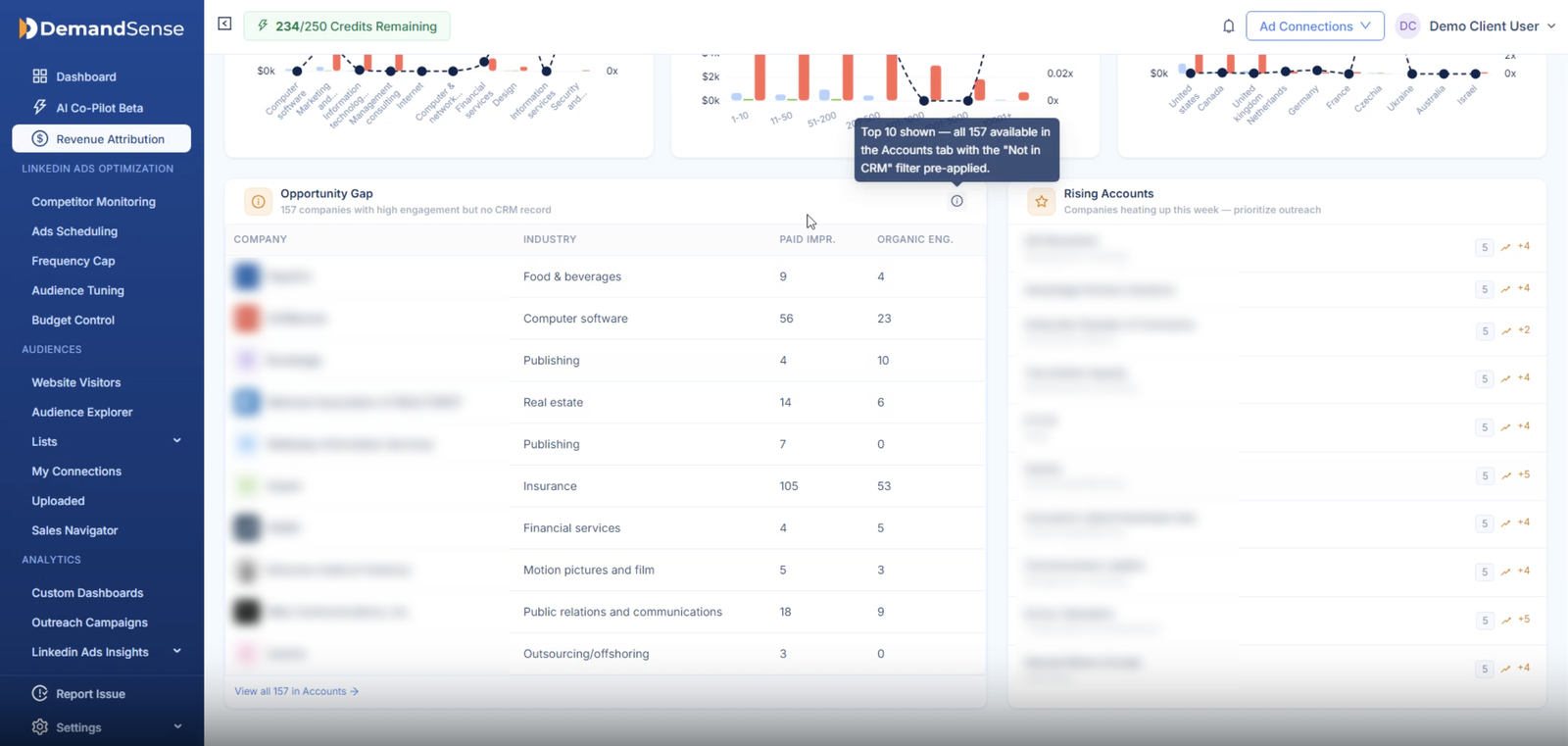
A company on your target list read your pricing page twice this week and has never clicked an ad. Fibbler can tell you a company was there, but only if you buy the Google Ads or Meta add-on at $59 per ad account a month, and only ever the company. In DemandSense identification is the product rather than an add-on. It resolves the visiting company anywhere in the world against an identity graph and, for US traffic, the person behind the visit, then scores the account against your ICP. It is what the Opportunity Gap panel is built on: engaged accounts that are not in your CRM yet.
The visit also shows on the account’s timeline next to its LinkedIn touches and the CRM deal, so the journey you read has the website in it. That data is what the rest of the platform runs on: the ICP score that decides who to suppress, the thresholds that decide what counts as influence, and the closed deals that go back to LinkedIn. It is the difference between a signal you can read and a signal you can act on. Fibbler’s journeys cover paid and organic LinkedIn. The full breakdown is in the DemandSense piece on how website visitor identification works with LinkedIn ads.
Stopping spend you can already see is wasted
You know your audience is not reading at 2 a.m. and you know the same forty accounts keep absorbing impressions. Fibbler’s scheduler pauses campaigns outside your window and reactivates them when it opens. Their own docs suggest keeping one campaign unscheduled so the relevancy score is preserved, which is an honest note about the cost of that method. Its impression cap adds a company to your Campaign Manager exclusions when it hits the monthly number, up to 200 companies per campaign per month.
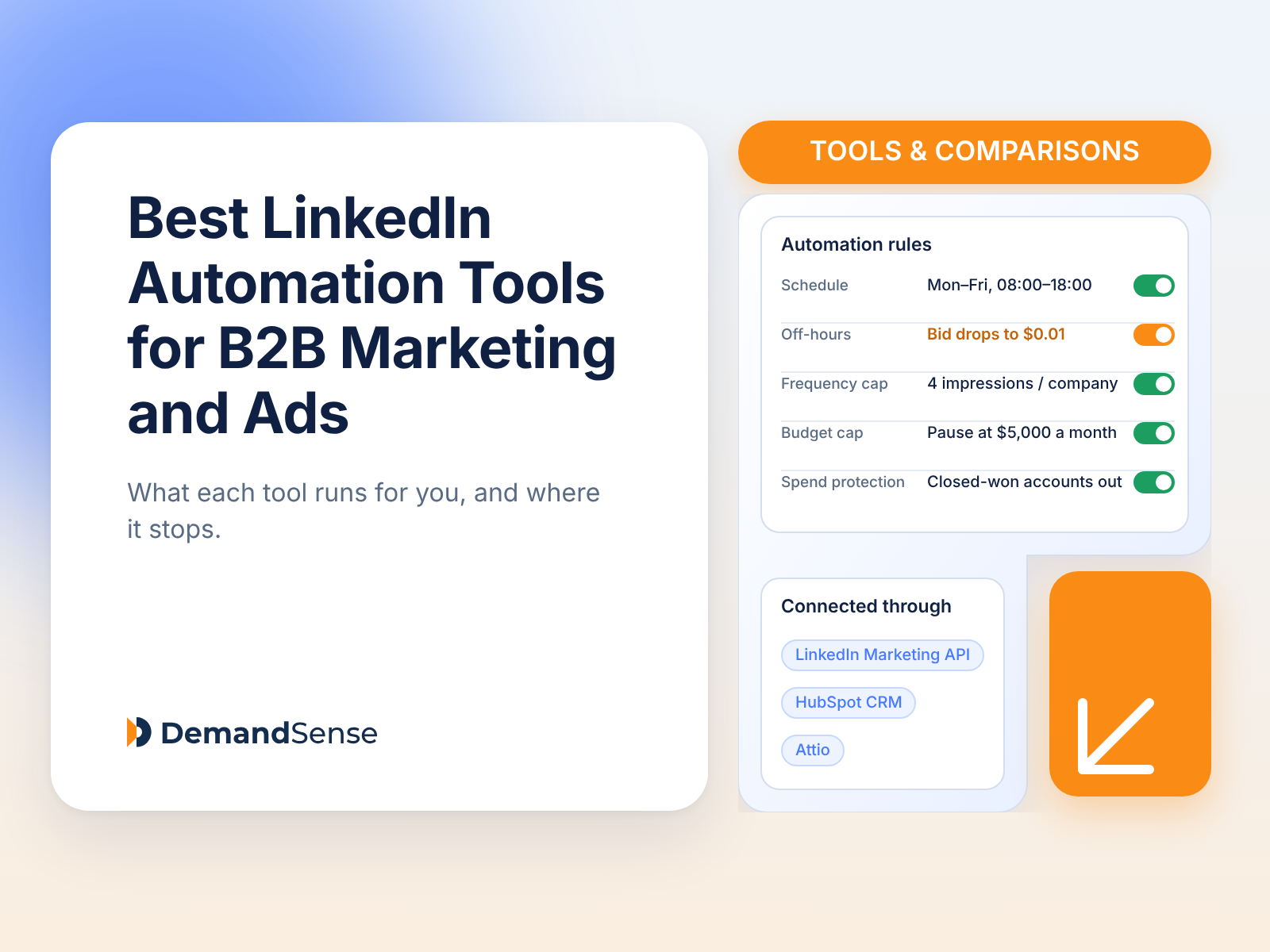
DemandSense drops the bid to $0.01 outside your hours instead of pausing, so LinkedIn’s optimisation history carries through the night. The frequency cap works per company, audience tuning removes job titles and companies outside your ICP, and the budget ceiling pauses campaigns at your cap and restarts them on the first. The one thing to know is that capping and suppression enforce weekly, not the moment you set them. There is a write-up of the four settings Campaign Manager does not give you if you want the detail.
Getting a warm account to a salesperson
An account crosses your intent threshold on a Wednesday. Fibbler posts it to Slack or Teams that day or in the weekly digest, with the engagement level attached, and can hand it to Clay or a Zapier flow from there. In DemandSense the account appears in Rising Accounts and, if it is not in the CRM, in Opportunity Gap. It can also go out over a webhook.
Sending Revenue Back to LinkedIn: The Conversions API
Everything above is data flowing out of LinkedIn. The Conversions API is the reverse direction, and it is the part technical readers ask about most often.
Campaign Manager optimises toward whatever conversion you give it. For most B2B accounts that is a form-fill, which means LinkedIn learns to find people who fill in forms. Sending it the deals instead, server-side from the CRM, lets it learn from who actually bought. LinkedIn’s own figures at launch were a 20% lower cost per action, 39% lower cost per qualified lead and 31% more attributed conversions, and those are LinkedIn’s own numbers. The Purchase and Qualified Lead event types also carry a 365-day attribution window, against 180 for most others, which matters when the deal closes nine months after the impression.
The native route has limits. HubSpot’s built-in LinkedIn sync sends lifecycle-stage changes only, not deal stages, and only for conversions within 90 days of an ad click. Building it yourself means a developer and an identifier-matching problem.
DemandSense runs two streams to LinkedIn’s Conversions API: closed-won deals as Purchase events with the deal amount attached, and qualified opportunities as Qualified Lead events. Each carries six identifiers for matching, syncs daily, and maps to a conversion rule in Campaign Manager that you can then optimise a campaign toward. Fibbler does not offer this. Its data moves from LinkedIn to your CRM and your alerting tools, and stops there. For setting up the rest of the tracking stack around it, start with the DemandSense guide to LinkedIn Ads conversion tracking.
Asking Your Data a Question: MCP
Both tools now expose their data to Claude and ChatGPT through an MCP server, and both are read-only. Neither will edit a campaign or move budget from a chat window, which is the correct decision for a tool that touches spend.
Fibbler’s MCP is included on the Unlimited and Agency plans and exposes around nineteen tools: campaign performance, influenced deals, journeys, warm accounts, correlation evidence and Google Ads data. It works with Claude, ChatGPT, Cursor and any client that supports remote MCP. That covers the main data sets Fibbler holds.
DemandSense MCP is open on every plan. The difference is what the model can ask. DemandSense MCP reads LinkedIn ad exposure, the identified website visit and the CRM state, so a question like “ICP-fit companies that saw our ads, visited the site, and are not in the CRM yet” is one question rather than three connectors the model has to reconcile. The walkthrough of analysing LinkedIn Ads with Claude shows what that looks like on a live account.
Is There a Downside?
Both, and neither is hidden. The most common wish among Fibbler’s reviewers is more from the reporting: date ranges finer than the fixed 30-day, 90-day and quarterly views, and a CRM sync that runs more often than weekly. The most common notes on DemandSense are the time it takes to get used to everything the platform does, and person-level identification being US-only. These are individual experiences of two products that both change month to month, so treat them as things to check in your own trial rather than settled verdicts.
Both rate well on G2, 4.9 for Fibbler and 5.0 for DemandSense.
Pricing
DemandSense
Fibbler
Entry
Base, $89/mo, 200 credits: revenue attribution, visitor identification, ad analytics for LinkedIn, Google, Meta and StackAdapt, the four controls, competitor monitoring, custom dashboards
Growth, $89/mo: one user, one LinkedIn account, attribution, HubSpot/Attio/Pipedrive, limited CRM sync, signals and optimisation
Mid
Plus, from $149/mo: the same features with 500 credits, climbing to 10,000
Unlimited, $129/mo: unlimited users, Salesforce, MCP, benchmarks, priority support
Agency
Cross-client management included; no separate agency plan
Agency, $159/mo for two workspaces, $69/mo each additional
Conversions API
Included
Not offered
MCP
Included on every plan
Unlimited and Agency plans
Attribution window
3, 6 or 12 months
12 months; 12 to 24 months of history
Free trial
30 days, every feature, no card
30 days, no card; annual billing saves up to 22%
G2
5.0
4.9
The entry prices match, and at $89 both include attribution. What else sits in that $89 is where they part. The DemandSense plan carries visitor identification, scheduling, frequency and budget controls, and competitor monitoring, on HubSpot, Salesforce or Attio. Fibbler’s covers one user and one LinkedIn account on HubSpot, Attio or Pipedrive, and Salesforce takes it to $129. The DemandSense Plus tier is a credit ladder that climbs with traffic, so price it against your real volume rather than the entry number.
What Fibbler Does Differently
Evidence: a correlation verdict comparing deals with LinkedIn touches against deals without. DemandSense reports influenced pipeline and Won ROAS, and does not offer a correlation view currently.
Signals to Slack, Teams, Clay, Zapier, n8n and Make, daily or weekly. DemandSense surfaces warming accounts in Rising Accounts and Opportunity Gap with a webhook push, and Slack and Teams alerts are not part of it today.
Organic LinkedIn as a first-class view. DemandSense counts organic engagement in its presets and shows it on each account’s timeline.
Twenty-four months of history, against twelve in DemandSense.
Spend-cohort benchmarks: seven metrics against four spend bands, on Unlimited and Agency. Benchmarks are something DemandSense does not offer currently.
Pipedrive, and a Google Ads add-on that puts Google spend next to the pipeline it touched. DemandSense runs on HubSpot, Salesforce and Attio, and reads Google Ads, Facebook Ads and StackAdapt alongside LinkedIn.
EU hosting with no personal data stored.
What DemandSense Does With It
The LinkedIn Conversions API, sending closed-won deals with their value and qualified opportunities as qualified-lead events, so Campaign Manager optimises toward buyers.
Website visitor identification as the core product rather than a paid add-on: companies globally and the people behind US visits, resolved against an identity graph and scored against your ICP.
The attribution, the ICP scoring, the spend protection and the MCP answers all work from the same three inputs: LinkedIn ad exposure, the identified website visit and CRM state.
A scheduler that lowers the bid instead of pausing, a per-company frequency cap, audience tuning by ICP, and a budget ceiling that restarts on the first.
Spend protection, so budget stops reaching accounts that already closed.
The website visit inside the account journey next to the ad touches and the deal.
Competitor ad monitoring in the same platform.
Salesforce and Attio at the same price as HubSpot.
Verdict
Choose Fibbler if the problem is that nobody believes LinkedIn is working. That is what they built, they built it well, and the Evidence view and 24 months of history are made for exactly that argument. If your sellers live in Slack, if organic LinkedIn is a real part of your pipeline, if you are on Pipedrive, or if you need to benchmark against similar spenders, those settle it.
Choose DemandSense if you want the proof and the levers in one place. The attribution is there from $89, the same entry price as Fibbler, under the same kind of thresholds, and it is wired to things Fibbler’s is not: LinkedIn’s own optimisation through the Conversions API, spend protection for accounts that already closed, and the companies reading your pricing page before any deal exists. If spend is leaking into hours nobody reads, if the same accounts absorb your impressions, or if you want Campaign Manager learning from closed deals rather than form-fills, those are problems a proof number alone does not fix.
Plenty of teams could run either. If you cannot choose, ask whether your next difficult conversation is with your CFO or with your own campaign. There is a longer list of options in the round-up of Fibbler alternatives if neither tool is the answer.
Conclusion
Fibbler proves the spend worked. DemandSense proves it too, and then uses the proof: to change the campaign while it is running, to show you who is on your site, and to send the closed deals back to LinkedIn so the next campaign starts smarter.
Both trials run 30 days without a card. Start with DemandSense and point it at the campaigns you have live right now.
FAQ
Is DemandSense a Fibbler alternative?
Yes. Both attribute paid and organic LinkedIn engagement to CRM revenue under Awareness, Engagement and Intent models with editable thresholds, so on that job they are close. They separate after it. DemandSense adds website visitor identification, ad controls, competitor monitoring and the Conversions API; Fibbler adds Slack and Teams alerts, an Evidence view, spend-cohort benchmarks and 24 months of history.
Does Fibbler support the LinkedIn Conversions API?
As of September 2026, no. Fibbler’s integrations move data from LinkedIn to your CRM and alerting tools. DemandSense sends closed-won deals and qualified opportunities from the CRM back to LinkedIn as server-side conversions on a daily sync.
Do DemandSense and Fibbler both have an MCP server?
Yes. Both are read-only and work with Claude and ChatGPT. Fibbler’s is included on its Unlimited and Agency plans. DemandSense MCP is open on every plan and reads ad exposure, website visits and CRM state.
Does DemandSense identify individual people, and where?
Companies anywhere in the world, and for traffic from the United States the person behind the visit, with job title and work email, scored against your ICP. Fibbler operates at company level and stores no personal data, which some teams prefer, particularly when an AI model is reading the output. If your privacy review is strict about personal data, raise that difference before the trial rather than after it.
Does Fibbler identify website visitors?
Only at company level, and only through its $59 Google Ads or Meta add-ons. DemandSense identifies visiting companies from any source and individual visitors for US traffic, with job title and work email, scored against your ICP.
See DemandSense in action
Book a personalized demo and discover how we can transform your B2B marketing.