LinkedIn Ads
LinkedIn Conversation Ads vs. Message Ads
Compare LinkedIn Conversation Ads and Message Ads: how each format works, which fits your campaign, and how to measure them beyond opens and clicks.
LinkedIn Ads
An ad campaign generates impressions but produces almost no conversions. The budget went to thousands of members who broadly fit the ideal customer profile (ICP) but have no real need for the product and no budget authority.
For B2B marketers this is a familiar problem, and LinkedIn targeting is the best tool available for fixing it. Google and Meta build audiences mostly from browsing behaviour and demographics. LinkedIn targets on professional data: where someone works, what their role is, how senior they are and what skills they list.
That precision has also made targeting harder to get right. Campaign Manager offers dozens of attributes across company, job, education, interests and traits, plus matched audiences and AI-built audiences on top. Pick too many and the audience is too small to deliver. Pick too few and you pay for reach outside your ICP. And the audience you set at launch starts drifting the day the campaign goes live.
This guide covers every LinkedIn targeting option, how audience and ABM targeting work, and how to keep refining your audiences once campaigns are running.
LinkedIn targeting lets you define who sees your ads, based on professional attributes, your own first-party data, or both.
Without it, a campaign meant for an enterprise CFO lands in front of recent graduates, freelancers and recruiters, and you pay for every one of those impressions.
LinkedIn targeting works in five layers:
If you’re setting up your first campaign, start with how to find your target audience on LinkedIn, which walks through Campaign Manager step by step. The rest of this guide covers each layer in more depth.
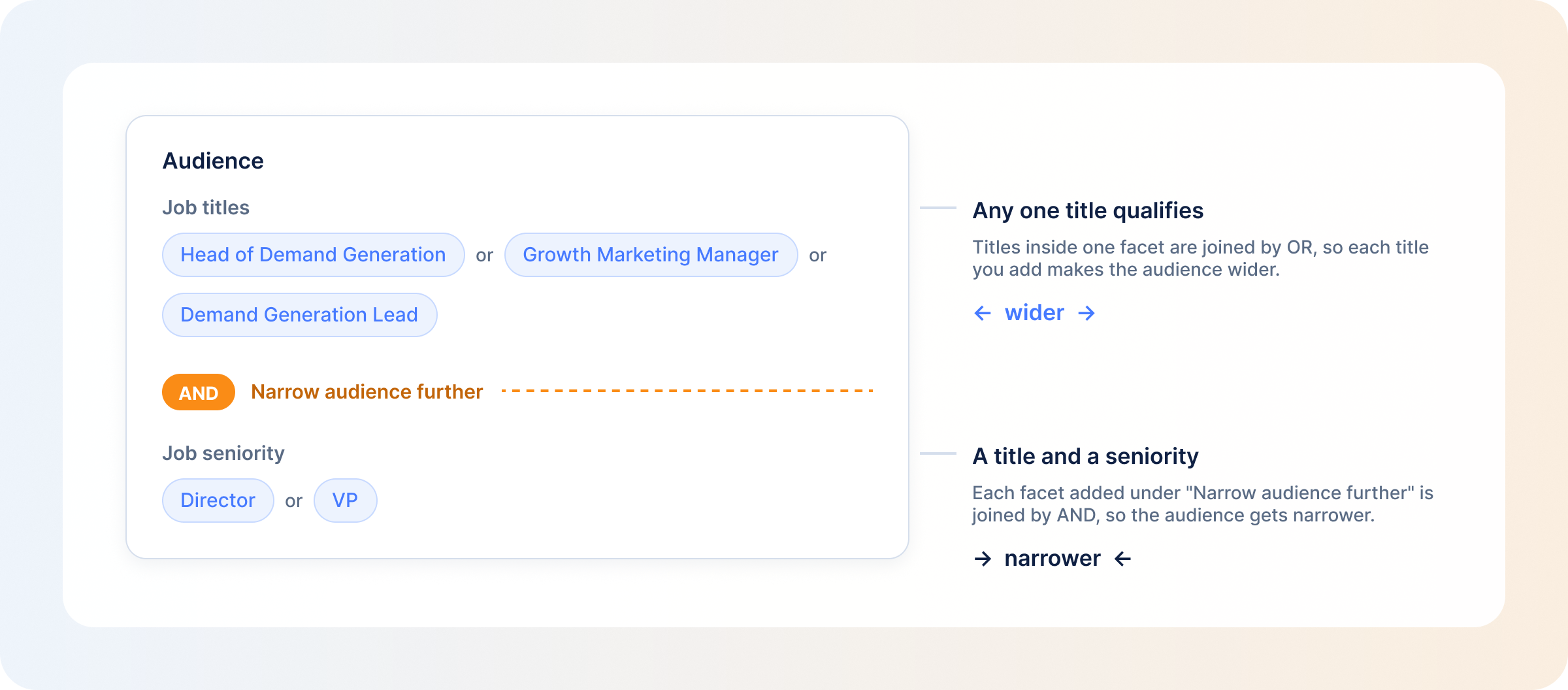
LinkedIn’s targeting options fall into locations, audience attributes and the custom audiences you build. How you combine them matters as much as which ones you pick. Attributes from the same facet widen the audience (a member needs to match any one of your job titles), while each facet you add under “Narrow audience further” shrinks it (a member must match one value from every facet).
Every LinkedIn campaign needs at least one location. You can target by continent, country, region or city, include or exclude locations in the same campaign, and choose between members’ permanent location and their recent location.
Company targeting defines the audience by where someone works rather than what they do. The attributes include company name, industry, size, growth rate, followers of a company Page, connections of a company’s employees, and company category, which covers segments such as funding stage, business type (public, private, nonprofit or government) and Fortune lists.
Job title selects members by the title on their profile. It’s precise but less scalable, because titles vary between companies. What one company calls a Head of Demand Generation, another calls a Growth Marketing Manager.
Job function groups members by the broader department they work in, like marketing, finance or engineering, without needing an exact title match.
Seniority filters by career level, from entry and senior through manager, director and VP to CXO, partner and owner. LinkedIn maps titles to both function and seniority with its own taxonomy, so a title it can’t map won’t show up under either.
Not every purchase is decided at C-suite level, and C-suite audiences are among the most competitive and expensive to reach on LinkedIn. Set seniority by who actually has budget authority or strong influence over the purchase, not who sounds most impressive on paper.
Industry targeting reaches members by the industry of the company they work at, using LinkedIn’s own industry list. That list doesn’t always match how companies describe themselves. SaaS, for example, isn’t a LinkedIn industry; software companies usually sit under Software Development or IT Services and IT Consulting.
Because of this, the industry filter is often more useful for excluding sectors you don’t sell to than for defining the ones you do.
Skills targets members whose profile lists or describes a skill, including skills LinkedIn derives from their job description and experience. Interests are inferred from what members engage with on LinkedIn, and traits from their actions, profile and device preferences.
Both add a behavioural dimension to targeting that is otherwise purely profile-based. A VP of Marketing who lists marketing attribution as a skill is a warmer prospect than one who matches only on title and seniority.
Education targeting filters by degree, field of study or school. It’s rarely the main criterion for a B2B campaign, but useful when educational background says something about fit, as it does for many technical or regulated roles.
Member group targeting reaches people who belong to specific LinkedIn Groups. Someone who joined a group about revenue operations is telling you what they care about at work, so it can surface an engaged audience that title targeting alone would miss.
Two limits apply. Groups can’t be used as an exclusion, and since May 2024 they’re not available for audiences in the EEA or Switzerland.
Audience expansion shows your ads to members with attributes similar to your target audience, even if they don’t match your exact filters. LinkedIn positions it for upper-funnel campaigns, and it isn’t available with predictive audiences, buyer groups or Auto-Targeting.
It can help delivery, but it decides who counts as “similar” for you. On a tight budget, broaden your own filters on purpose rather than handing that decision to LinkedIn’s algorithm.
LinkedIn discontinued lookalike audiences in February 2024. Predictive audiences replaced them. You give LinkedIn a source (a contact list, company list, conversion, Lead Gen Form or retargeting audience) and it finds members with similar attributes who are likely to convert.
Buyer groups are LinkedIn’s AI-built audience for reaching the group of people who make a purchase decision together at a company. You choose a product category, and LinkedIn’s models find the decision-makers and key stakeholders for it. Auto-Targeting goes further and builds the whole audience for you.
All three trade control for reach. Predictive audiences and buyer groups work best once you know what a good audience looks like for your product. Use them to expand from a validated audience, not to replace professional targeting at launch.
Audience targeting builds campaigns around people who have already shown interest in your business. Most B2B buyers visit your website, download content, read case studies, click on ads or fill in a form before they buy. They’re cheaper to reach and easier to convert than any cold audience built from profile filters alone.
LinkedIn gives you two ways to do this: retargeting and list uploads. Both sit under Matched Audiences, and both need at least 300 matched member accounts to run.
Retargeting reaches people who have already interacted with your business on your website or on LinkedIn. The LinkedIn retargeting guide covers every audience type in detail; these three carry most B2B campaigns.
Website retargeting builds an audience from website visitors through the LinkedIn Insight Tag. You can target all visitors, visitors to specific pages, or visitors who completed an action, and the audience updates as new people visit.
The value is in the segmentation. A pricing page visitor is closer to a purchase decision than a blog reader, so build separate audiences for different pages and give each one a message that matches where they are. Knowing which companies are behind those visits adds another layer: website visitor identification shows them, so you can prioritize follow-up for the accounts that matter most.
If you run video ads, you can build retargeting audiences by how much of a video someone watched: 25%, 50%, 75% or 97%. Completion is one of the strongest intent signals in LinkedIn’s retargeting options. Someone who watched most of a two-minute product explainer has shown more interest than a single impression ever can.
Use it as a two-step funnel: a short awareness video to a cold professional audience, then a more direct offer only to the high-completion viewers.
Lead Gen Forms give you two retargeting audiences: people who opened the form and people who submitted it. The ones who opened it and didn’t submit were engaged enough to start and stopped short of converting.
Give form openers a different message from your submitters. A content asset that answers the objection that likely stopped them, or a feature that fits what they were looking for, gives them a reason to finish.
List uploads use your first-party data to reach specific people or companies. This is where LinkedIn contact targeting and LinkedIn email targeting come in. The LinkedIn custom audiences guide covers list requirements and upload step by step.
Upload a CSV of contacts and LinkedIn matches the email addresses to member profiles. You can serve ads to the matched members directly or use the list as the source for a predictive audience. LinkedIn doesn’t publish a match rate, so expect some of the list not to match and check the matched count before you plan the budget around it. In the EEA and Switzerland, only members who opted in can be matched.
Contact lists also let you coordinate channels. You can run an email sequence to the same list you’re serving ads to, and a contact who ignored the first email but clicked your LinkedIn ad twice is more likely to engage when the next email arrives.
For account-based targeting, you upload a list of companies instead of contacts. LinkedIn matches the list against company Pages and builds an audience of the people who work there. With job title and seniority filters on top, you reach the relevant decision-makers at every company on the list, including the ones your sales team has never spoken to. Tracking account-level engagement signals across that list shows you which companies are warming up before sales reaches out.
| Contact targeting | Account-based targeting | |
|---|---|---|
| What you upload | Email addresses of named people | Company names and details |
| Who LinkedIn reaches | The matched individuals | Employees of the matched companies, filtered by role |
| Works on | Person level | Company level |
| Best for | CRM leads, event lists, open opportunities | Target account lists, including people you don’t know yet |
| Minimum to run | 300 matched member accounts | 300 matched member accounts |
Email targeting is a delivery method: you know the people and want to reach them. ABM targeting is a strategy that uses account lists to reach several decision-makers across target companies.
The strongest ABM campaigns run both in parallel. The account list covers the stakeholders you don’t know yet, and the contact list makes sure the ones you do know aren’t missed.
Account-based marketing on LinkedIn sounds simple: target the right companies, reach the right people, close more deals. Most B2B teams manage the first part. The second and third are where it falls apart.
The usual mistake is treating an account like a single person: one audience, one campaign, and the hope that it reaches the decision-makers inside it. Enterprise purchases involve several decision-makers, each with different priorities and different reasons to say yes or no, and one campaign can’t speak to all of them.
Start by uploading your target companies and splitting them by revenue potential, so budget goes first to your highest-value accounts. Within those accounts, build a separate campaign for each decision-maker type, with messaging aimed at that role’s problems. This is role layering. Run it across the whole tier and you get multi-threaded coverage: every decision-maker at the account hears from you at the same time.
In practice, a CFO at a target account sees a campaign about cost justification, the IT Director sees one about implementation and security, and the RevOps lead sees one about pipeline impact.
The B2B ABM strategy guide covers how to prioritize accounts, and ABM prospecting covers building campaigns around them.
Most teams build their account list once and don’t revisit it. Targeting is set at launch, and performance gets reviewed when something looks obviously broken. On a channel as expensive as LinkedIn, that’s a costly way to operate.
Account lists have a shelf life. People change jobs, retargeting pools shrink when website traffic drops, and companies on the list move on to other priorities. As the audience drifts away from your ICP, you keep paying for impressions that were never going to convert.
Over-layering makes it worse. Every facet you add under “Narrow audience further” shrinks the audience, and a small audience leaves the algorithm little room to optimize. Frequency climbs, costs rise and performance plateaus. LinkedIn flags the extreme cases with an “Audience Too Narrow” notification, but an audience can be too small to perform well long before that appears.
With several campaigns running in parallel, audience overlap is almost guaranteed. The same members qualify for more than one campaign, and each campaign reports their impressions as its own. Every campaign can show a reasonable CPC on its own while the total spend, measured against pipeline, tells a different story. Overlapping campaigns also bid against each other in the same auction.
Manual optimization (reviewing performance, refreshing creative, rebuilding audiences, adjusting bids) is necessary work, and slow. By the time a cost spike shows in the dashboard, the spend has already gone. Testing audience variants takes time too, because each variant needs enough impressions before any conclusion is reliable. And if your buyers are concentrated in one region, when your ads deliver matters as much as who they reach.
The slow part of manual tuning is usually seeing where the budget went. DemandSense audience tuning shows every job title and company your budget is reaching, so you can cut the ones wasting it without rebuilding anything in Campaign Manager.
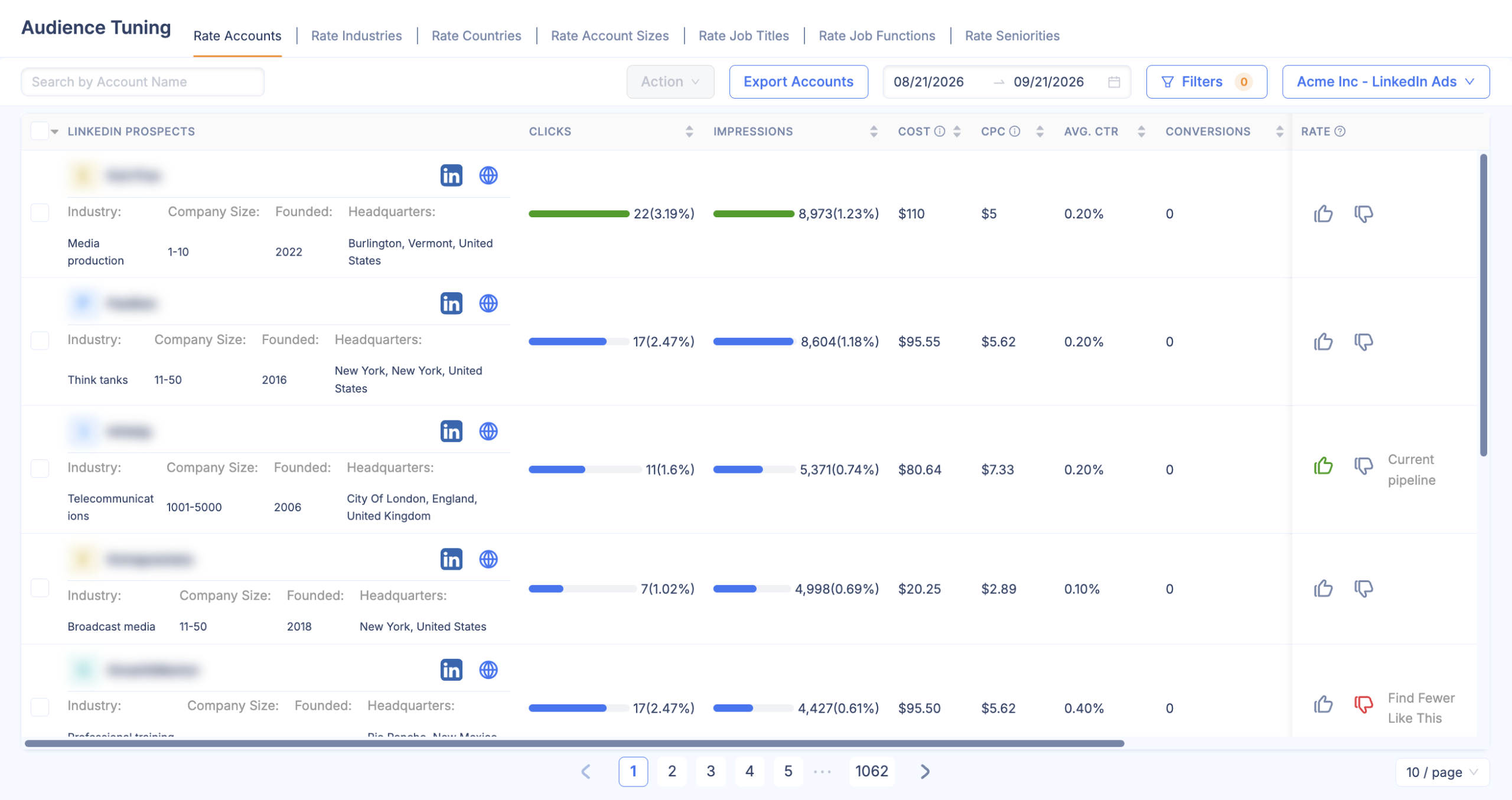
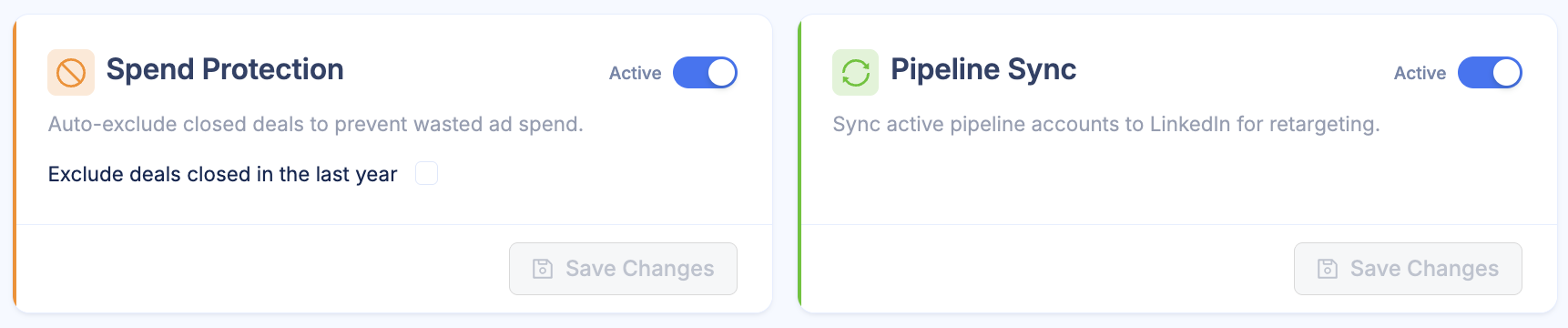
The analysis and the decisions stay with you; you just get to them faster.
Say a campaign launches with layered targeting, and early results show one cluster of companies converting at a much higher rate than the rest of the audience. With company-level data in front of you, you can put more budget behind that cluster and pull back from the companies that never engage. Cost per qualified lead drops without rebuilding the campaign from scratch.
Professional targeting defines your audience by what they do for a living: job title, function, company and seniority. Interest targeting defines it by what they engage with: the topics they follow, the content they interact with and the groups they belong to.
The two serve different stages of the funnel and work best together.
Professional targeting reaches buyers in the evaluation stage with precision. The tradeoff is cost and scale. Small, precise audiences are expensive, because competitors are often bidding for the same members. And once you’ve saturated your ICP, there’s nowhere left to grow.
Interest targeting trades precision for scale. It builds awareness with early-stage buyers before they start evaluating. A finance leader who engages a lot with content about forecasting accuracy is showing you, through their behaviour, that they’re thinking about a problem you can solve.
Interest-based audiences are usually larger and less contested, which means lower CPMs. Lower CPMs don’t help pipeline efficiency if the audience doesn’t convert, though, so the best campaigns layer both.
Use the interest layer to reach the part of your professional audience that’s still in the awareness stage, or use the professional layer to qualify a broad interest audience. The second works well when your ICP is defined less by a job title and more by a growth stage, such as early-stage founders.
When you publish a post on your LinkedIn Page, you have limited control over who sees it.
Page admins can create targeted posts that are shown actively only to followers who match criteria such as company size, industry, function, seniority, location and language. A targeted post has to reach at least 300 Page followers, and it can still travel further when people share it.
Organic reach is bound by your follower count, which in turn depends on your history on the platform. A company with 2,000 followers can’t reach the same audience organically as one with 200,000, whatever the quality of the content. And if the first people to see a post don’t engage, it gets less distribution from there.
Organic results are also hard to tie to revenue. Impressions and engagement are easy to see; which of them influenced pipeline is a separate question.
Paid targeting removes those limits. You decide who sees your content whether or not they follow your Page, and you get what organic can’t offer: conversion tracking, audience exclusions, A/B testing and budget allocation by segment.
The useful way to plan is organic first, then paid. Organic content builds familiarity with your existing audience at no extra cost, and paid turns that familiarity into pipeline and extends your reach to people who’ve never heard of you. Analyzing both together shows you which topics and formats drive engagement and which paid segments convert, which is what continuous audience refinement runs on.
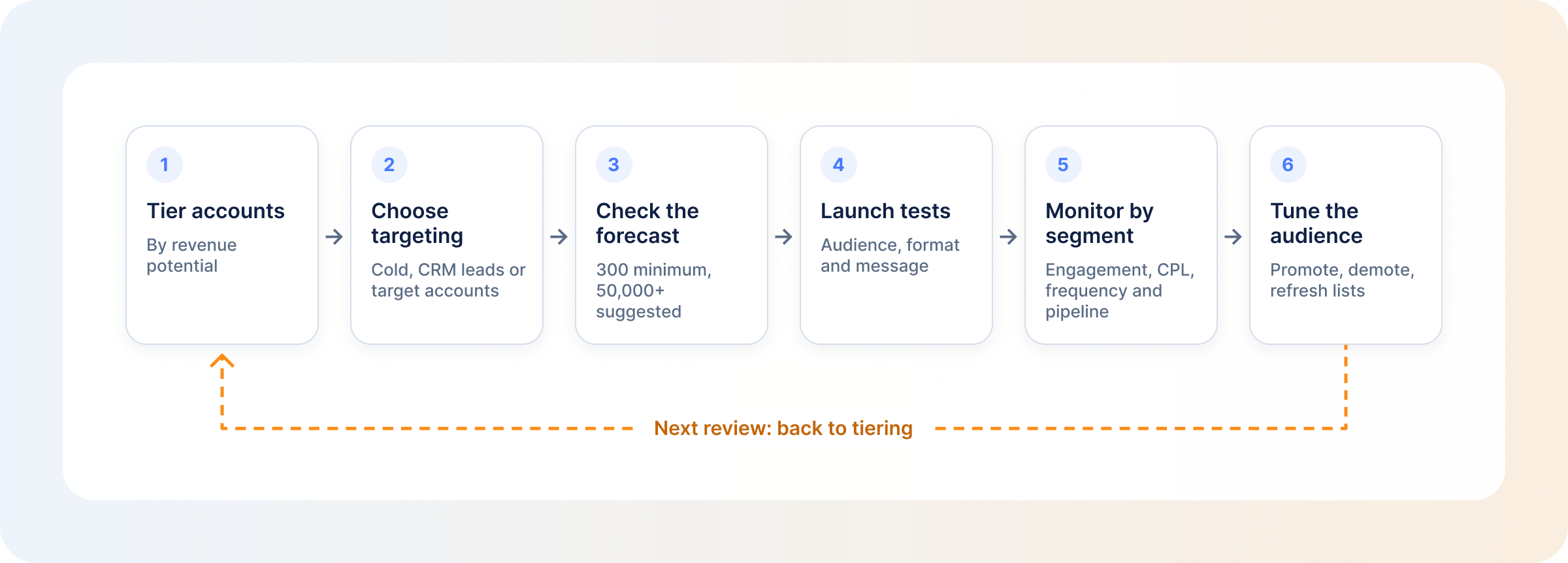
Not every ICP company deserves the same investment. Before building campaigns, split your target accounts into tiers by revenue potential.
Your highest-value accounts get the most sophisticated setup: role-layered campaigns, multi-threaded coverage, higher frequency and more personalized creative. For the other tiers, one audience per segment is usually enough.
Match the targeting to where the audience sits relative to your business:
Campaign Manager shows a forecasted audience size before a campaign goes live. LinkedIn’s audience size guidance sets a minimum of 300 member accounts and suggests at least 50,000 to drive results, with larger audiences recommended for Sponsored Content and Sponsored Messaging.
A tight ABM list or a retargeting audience will often sit below that, which is fine as long as you watch frequency. For prospecting campaigns, if the forecast comes in small, loosen one criterion at a time: drop the seniority filter, widen the company size range or add an adjacent job function. If it comes in very large, check whether the ICP definition is too broad and you’re paying to reach people who will never buy.
The variables most worth testing at launch are audience segment, ad format and message. Run versions of the same campaign to learn which audience responds, which formats they prefer and which content lands.
Put most of the budget behind your best-hypothesis campaign and split a smaller share across the test variations. You learn without giving up performance.
Break performance down by audience segment and track engagement rate, cost per lead and frequency for each one, alongside its pipeline contribution. LinkedIn ads analytics shows the first three by segment, and revenue attribution shows the last.
A segment with falling engagement is probably fatigued and needs new creative or a larger audience. A segment that produces plenty of leads that never convert is being optimized for quantity, so shift the criteria toward pipeline contribution. Connecting segment metrics to closed revenue takes attribution data that connects LinkedIn impressions to pipeline in your CRM.
Review performance monthly at minimum, and weekly if spend is significant. The goal is to catch decline before it gets expensive.
Your segments should change as campaigns run. In each review, move underperforming accounts to a lower tier and promote accounts showing strong engagement. Revisit your ICP criteria against pipeline data, and replace stale contact and account lists.
LinkedIn targeting lets you reach specific professional audiences by job title, company, industry, seniority, skills, interests and your own first-party data. Because it runs on professional profile data, it’s one of the most precise ways to reach B2B buyers.
LinkedIn offers targeting by location, company attributes, job title, function, seniority, skills, education, interests, traits and member groups. It also supports matched audiences (contact lists, company lists and retargeting) and AI-built audiences such as predictive audiences and buyer groups.
You upload a list of target companies, LinkedIn matches it against company Pages, and it builds an audience of the people who work there. You then narrow that audience by job function, seniority or title to reach the relevant decision-makers at each company.
Yes. LinkedIn email targeting works through contact list uploads in Matched Audiences. LinkedIn matches the email addresses to member profiles and serves ads to the members it matches. It doesn’t publish a match rate, and the audience needs at least 300 matched members to run.
Static targeting doesn’t adapt as campaigns run. Contact lists go stale, retargeting pools change size and account lists drift away from your ICP. Without regular audience refinement, costs rise, frequency climbs and budget keeps going to segments that no longer convert.
Audience tuning is the ongoing work of refining targeting based on how each segment performs: putting more budget behind the companies and roles that convert, and excluding the ones that don’t. Done regularly, it improves pipeline efficiency and cuts wasted spend without rebuilding campaigns from scratch.
Book a personalized demo and discover how we can transform your B2B marketing.
See a quick demo videoLinkedIn Ads
Compare LinkedIn Conversation Ads and Message Ads: how each format works, which fits your campaign, and how to measure them beyond opens and clicks.
LinkedIn Ads
Revenue Attribution & Measurement
Yes, in four ways. See what CRM Sync, Lead Gen Form integrations, the Conversions API and connectors each move between LinkedIn Ads and your CRM.
LinkedIn Ads
See how much LinkedIn ads cost in 2026: CPC, CPM, CPL and minimum budgets. Real B2B benchmarks and ways to lower your LinkedIn advertising costs.
Get expert insights and strategies delivered to your inbox weekly.
