LinkedIn Attribution Model Explained: How B2B Teams Connect Ads to Revenue
See how LinkedIn attribution models work, where Campaign Manager falls short for B2B reporting, and how teams connect ads to CRM, pipeline, and revenue.
Share:
Open your LinkedIn Campaign Manager dashboard, and you’ll see impressions, clicks, leads, and conversions climbing steadily. What you won’t see is whether any of that activity actually turned into pipeline, deals, or closed-won revenue. That gap is the core problem with a LinkedIn attribution model built only on native ad metrics: it tells you what happened on the platform, not what happened to your business.
For B2B teams, this is more than a reporting inconvenience. Ad spend decisions, budget optimization, and demand generation strategy all depend on connecting LinkedIn Ads activity to what the CRM shows: opportunities created, deals advanced, and revenue closed. Without that connection, you are left defending campaigns with click-through rates while sales and finance ask about ROAS and ROI.
This is where revenue attribution comes in: it links ad-level performance to CRM data, so marketing can show its real contribution to the buyer journey, not just activity on the platform.
Summary: What LinkedIn Attribution Model Comparison Really Shows
Comparing LinkedIn attribution models against each other shows one thing clearly: no single model tells the whole story. Some differ in when they assign credit, others in whose activity they measure:
Last-touch attribution shows what closed the deal, but hides every touchpoint that came before it
First-touch attribution shows what started the buyer journey, but ignores everything that kept the deal moving
Multi-touch attribution spreads credit across touchpoints, giving a fuller view of campaign performance
Account-level attribution shows which target accounts engaged with LinkedIn Ads, even when no single contact clicked
Contact-level attribution shows individual engagement, but misses the buying committee members who never interacted directly with an ad
When B2B teams run these models against the same CRM data, patterns emerge: campaigns that look weak on last-touch attribution often show strong influenced pipeline once impressions and account-level engagement are factored in. That comparison is what turns LinkedIn Ads reporting from a vanity-metric exercise into a real input for budget optimization.
What Is a LinkedIn Attribution Model?
A LinkedIn attribution model is the set of rules used to decide which LinkedIn Ads touchpoints get credit when a lead, deal, or piece of revenue shows up in the CRM. Instead of treating every impression, click, and engagement as equally important (or ignoring all but one), an attribution model assigns credit based on a defined logic: the first interaction, the last interaction, or something in between.
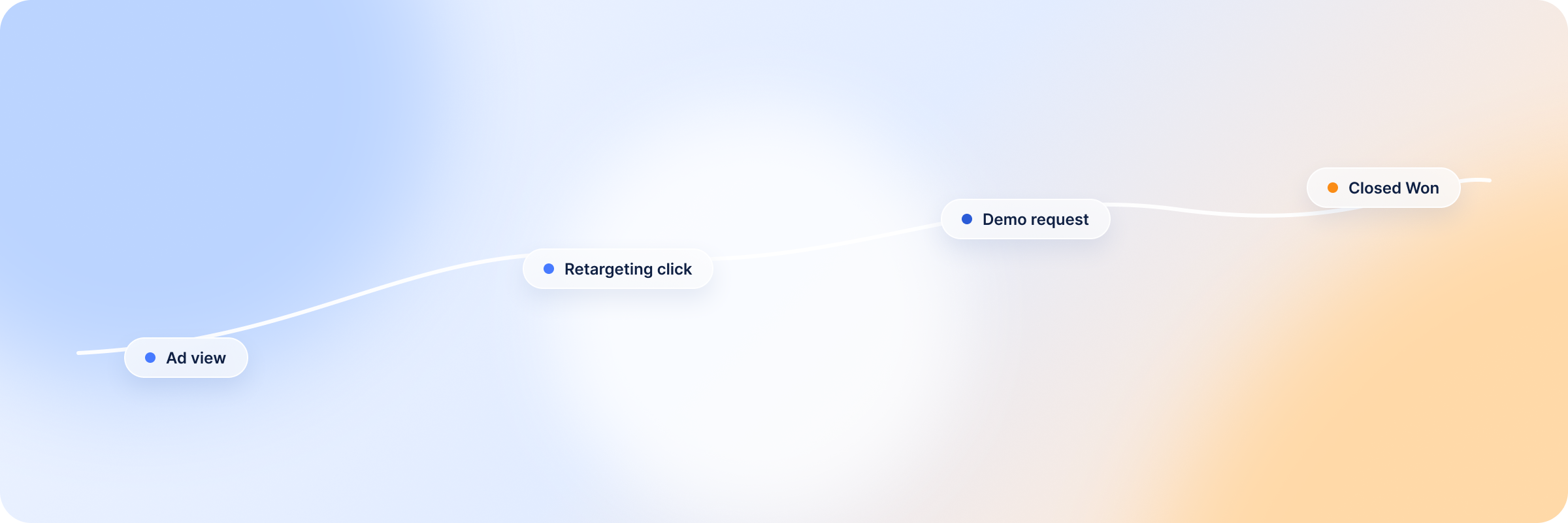
For B2B marketing, this matters because a single deal rarely comes from one touchpoint. A prospect might see a sponsored post, click a retargeting ad two weeks later, then convert after a direct visit to the website. The attribution model determines how much of that closed-won revenue gets credited to LinkedIn Ads, and to which specific campaign or ad.
Attribution models typically work at one of two levels:
Contact-level attribution, which tracks individual engagement (a specific person clicking or converting)
Account-level attribution, which tracks engagement across an entire target account, useful for ABM campaigns where multiple people in the buying committee interact with ads before a deal is created
How LinkedIn Attribution Works in Campaign Manager
Inside Campaign Manager, LinkedIn attribution runs on a fairly simple default: last-touch, click-and-view based. Here’s how it actually works:
LinkedIn’s Insight Tag tracks two types of interactions: post-click conversions (someone clicked an ad, then converted) and view-through conversions (someone saw an ad without clicking, then converted)
Each conversion action has an attribution window. The default is 90 days for both click-through and view-through, and both can be set to 1, 7, 30, or 90 days, with 180 or 365 days for some offline events sent through the Conversions API
By default, Campaign Manager uses last-touch attribution: if a member converts within the window, credit goes to the most recent ad click or view, not any earlier interaction
For conversions tied to multiple campaigns, you can choose between “Last Touch – Each Campaign” (every campaign with an interaction in the window gets credited) or “Last Touch – Last Campaign” (only the most recent campaign gets credited)
This setup works reasonably well for short, single-touch conversions. It struggles with B2B, where a conversion window measured in days often closes long before a real buying decision does.
Main LinkedIn Attribution Models B2B Teams Should Understand
Data-Driven Attribution
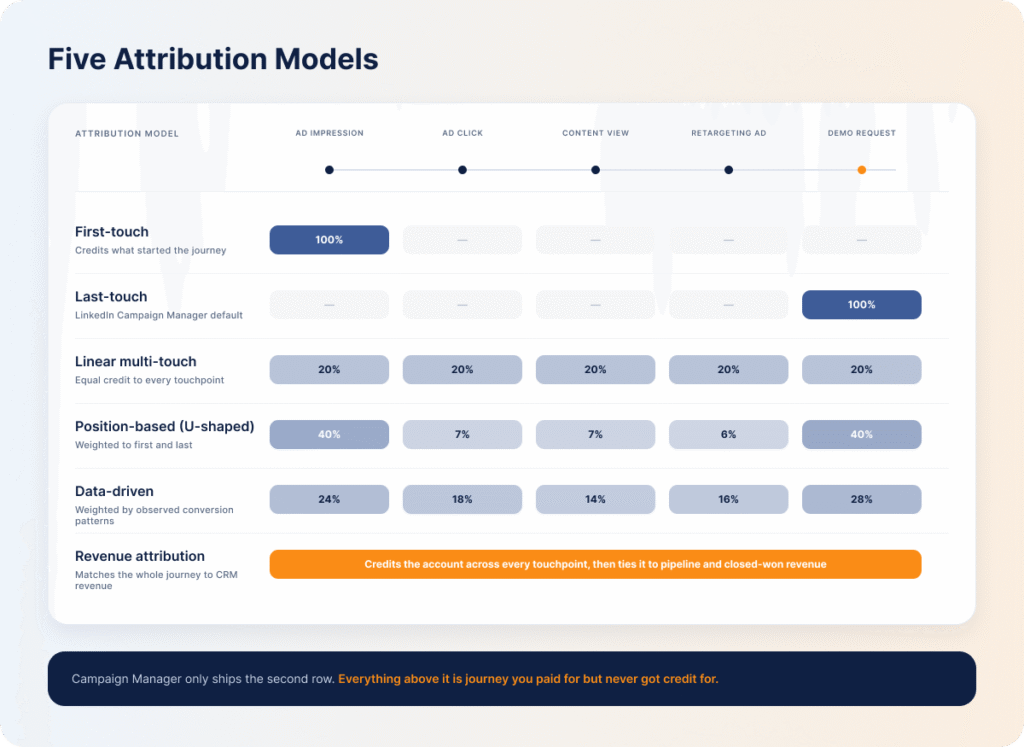
Instead of applying a fixed rule (like “credit the last click”), data-driven attribution uses machine learning to assign credit based on patterns in actual conversion data. LinkedIn’s own research team published LiDDA, a transformer-based attribution model that uses attention mechanisms to weigh each touchpoint’s contribution rather than crediting only the first or last interaction. LinkedIn has applied a version of it within its own ads measurement — a real shift away from last-touch, toward models that account for upper-funnel impact across the buyer journey.
First-Touch Attribution
First-touch attribution gives 100% of the credit to the very first tracked interaction — the ad impression or click that introduced the account to the brand. It’s useful for understanding which campaigns are driving initial awareness, but it ignores every touchpoint that came after, including the ones that ultimately moved the deal forward.
Last-Touch Attribution
Last-touch attribution is LinkedIn’s default model in Campaign Manager, where full credit goes to the most recent ad interaction before a conversion. It’s simple and easy to report on, but for B2B specifically, it tends to reward bottom-of-funnel, high-intent campaigns while erasing the influence of the awareness and consideration-stage ads that built up to that final touch.
Rule-Based Multi-Touch
Rather than crediting one touchpoint, rule-based multi-touch models split credit across several using a fixed formula. Common variations include linear attribution (equal credit to every touchpoint), time-decay (more credit to touchpoints closer to conversion), and position-based or U-shaped models (heavier credit to the first and last touch, with the remainder split across the middle).
Revenue Attribution Reporting
This is where attribution moves from ad platform to revenue outcome. LinkedIn’s Revenue Attribution Report (RAR) connects CRM data — HubSpot or Salesforce — to ad exposure, showing pipeline amount, revenue won, and ROAS for deals where a contact was exposed to LinkedIn Ads. LinkedIn expanded RAR’s lookback window to 365 days as part of its 2026 Conversions API and reporting updates, a meaningful shift for B2B teams whose sales cycles regularly run well past the platform’s original attribution windows.
LinkedIn Campaign Manager vs DemandSense: Attribution Metrics Compared
Campaign Manager and DemandSense measure attribution on fundamentally different timelines. Native LinkedIn reporting counts conversions per member inside a window of up to 90 days for clicks and views, with last-touch as the standard model — designed for shorter, more direct conversion paths. DemandSense takes the opposite approach: a lookback window you set to 3, 6 or 12 months, built specifically around how long B2B deals actually take to close.
The differences extend past the window itself:
Attribution aspect
LinkedIn Campaign Manager (native)
DemandSense
Attribution window
Up to 90 days for clicks and views (the default), 180 or 365 days for some Conversions API events
Lookback of 3, 6 or 12 months before the deal was created — built around real B2B sales cycles
What counts as influenced
Last-touch only, fixed unless manually adjusted
Awareness, Engagement or Intent presets, or your own thresholds
Attribution level
Individual click or view events only
Account-level AND contact-level, including company activity from people who never clicked
Revenue connection
Conversions shown inside Campaign Manager’s dashboard only
Syncs directly to HubSpot, Salesforce or Attio: active pipeline, closed-won, and closed-lost deals against actual ad exposure
Sending revenue back to LinkedIn
A Conversions API build of your own
Closed-won deals and qualified opportunities through LinkedIn’s Conversions API, on a daily sync
Company identification
Not built in; relies on click/view events and form fills
Sensor Pixel identifies companies globally, plus named contacts in the US
None of this makes Campaign Manager reporting useless. It’s still the fastest way to check impressions, clicks, and ad-level performance in real time. It’s just not built to answer the revenue attribution question your team actually needs answered — for a closer look at how dedicated tools compare, see the best attribution software for B2B LinkedIn advertisers.
Why Native LinkedIn Attribution Is Not Enough for B2B Reporting
Native LinkedIn attribution was built around the assumptions of shorter, more direct conversion paths. B2B buying doesn’t work that way, and the gap shows up in a few specific ways:
Attribution windows are too short for day-to-day decisions. Standard conversion tracking tops out at 90 days. Even the Revenue Attribution Report’s newer 365-day lookback is CRM-tied reporting, not something campaign optimization or bidding can act on, so most budget calls still run on a window that closes long before a typical B2B sales cycle does
Last-touch attribution hides most of the journey. Full credit goes to the final interaction, erasing every earlier impression, engagement, or piece of content that moved a deal forward
It’s contact-level, not account-level. B2B deals involve a buying committee — multiple stakeholders engaging with ads and content over time, not a single decision-maker clicking once and converting
It stops at the platform’s edge. Campaign Manager reports conversions inside LinkedIn. It has no native visibility into what happens to that lead in the CRM: whether it became active pipeline, a closed-won deal, or a closed-lost deal
One benchmark puts this in perspective: Dreamdata’s 2026 B2B benchmark study found an average buyer journey of 272 days involving 88 touchpoints before a deal closes. Even LinkedIn’s default 90-day window, by definition, can only see the last third of that journey.
How to Build a LinkedIn Attribution Model for B2B
Building a LinkedIn attribution model that actually works for B2B reporting comes down to six steps:
Define what you’re measuring. Before connecting any data, decide what “success” means: leads, sourced pipeline, influenced pipeline, closed-won revenue, or ROAS. Each goal points to a different attribution setup, and trying to track all of them equally usually means measuring none of them well
Connect LinkedIn Ads to CRM data. Integrate Campaign Manager with HubSpot or Salesforce so ad exposure data can be matched against opportunities, deals, and revenue, not just leads sitting inside LinkedIn’s own dashboard
Track both clicks and impressions. Click-only tracking misses view-through influence entirely. For B2B, where prospects often see an ad several times before ever clicking anything, impression-level data is part of the real picture, not noise
Measure account-level engagement, not just contact-level. Set up reporting that rolls up engagement to the account, so a deal gets credit for LinkedIn Ads influence even when three different people at the buying committee interacted with campaigns and none of them was the one who filled out the form
Map campaigns to opportunities and revenue. Tag or sync campaigns so they show up against CRM revenue data directly: which campaigns touched which opportunities, and how those opportunities moved from active pipeline to closed-won or closed-lost
Review attribution data regularly. Attribution isn’t a one-time setup. Revisit reporting on a set cadence (monthly or quarterly works for most teams) to catch shifts in what’s actually driving pipeline, and adjust budget optimization decisions accordingly
Best Practices for LinkedIn Attribution Models
Setting up a model is the easy part. Keeping it useful is where most teams drift:
Match the model to the decision, not the other way around. Last-touch is fine for a quick channel-level check; don’t let it drive budget calls for campaigns with long consideration cycles
Reconcile numbers across systems before you present them — and do it inside a meeting that already exists. LinkedIn’s dashboard, your CRM, and any attribution tool rarely agree to the dollar. Decide in advance which system is the source of truth for pipeline and revenue, and fold that reconciliation into your existing pipeline review or marketing ops sync rather than standing up a new recurring meeting that quietly dies by Q2
Revisit the lookback window as your sales cycle changes. A window sized for a 90-day cycle stops helping once your average deal stretches past 200 days — check it against real CRM data at least once a year
Give sales visibility into account-level engagement, not just marketing. When SDRs and AEs can see which target accounts have been engaging with ads, attribution stops being a marketing report and starts informing outreach
Treat contact-level and account-level attribution as complementary, not competing. Contact-level tells you who engaged; account-level tells you whether the right company is moving. Teams that track only one get an incomplete picture of ABM campaigns
Optimize Your LinkedIn Campaigns with Accurate Attribution in DemandSense
Everything covered so far, including attribution windows, account-level engagement, mapping campaigns to revenue, is exactly what DemandSense is built to handle for LinkedIn Ads specifically.
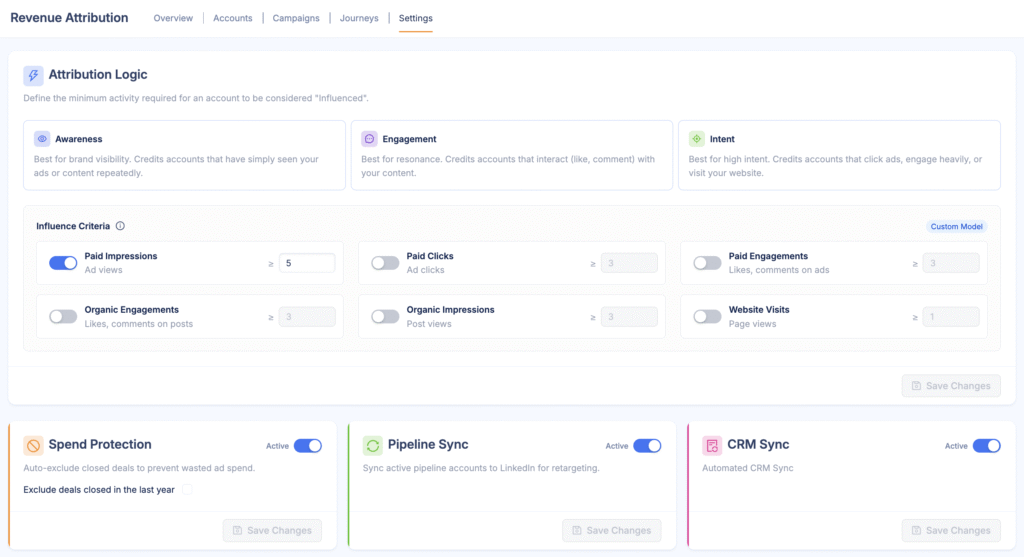
Instead of working inside a per-member conversion window, DemandSense runs on a lookback window you set to 3, 6 or 12 months, built around the actual length of a B2B sales cycle. Rather than defaulting to a single last-touch model, it offers three presets — Awareness, Engagement, and Intent — or your own thresholds, so you decide what counts as influenced. And instead of stopping at conversions inside a dashboard, DemandSense connects directly to HubSpot, Salesforce or Attio, so campaigns map to real opportunities, active pipeline, and closed-won revenue, not just leads.
That attribution data also feeds back into DemandSense’s own ad controls, so budget and audience decisions are driven by what’s actually influencing pipeline, rather than a best guess.
The read starts before the deal does. The companies engaging with your ads show up while the campaign is still running, and when the deal appears in your CRM weeks or months later, it connects back to the ads that influenced it, so the early read gets confirmed rather than second-guessed.
DemandSense also sends the result back. Closed-won deals with their value, and qualified opportunities, go from your CRM to LinkedIn through the Conversions API on a daily sync, so Campaign Manager optimises toward buyers rather than form fills.
For B2B teams trying to build the kind of attribution model described above — define a goal, connect CRM data, track account-level engagement, map campaigns to revenue — DemandSense handles most of that setup natively rather than requiring it to be built manually across spreadsheets and exports.
LinkedIn Campaign Manager uses last-touch attribution by default: whichever ad interaction, click or view, happened most recently before a conversion gets full credit, within a conversion window that defaults to 90 days for clicks and views.
What is the most effective LinkedIn ad format?
The most effective LinkedIn ad format depends on the goal. For engagement and awareness, native, first-person content (including Thought Leader Ads) tends to perform strongly. For gated content and lead generation specifically, document ads are commonly cited as a strong performer because they let people preview content natively without leaving LinkedIn. There’s no single “best” format across every objective, so this is worth testing against your specific funnel stage.
What is an example of an attribution model?
Last-touch attribution is a common example of an attribution model: if a prospect clicks a LinkedIn ad, later downloads a whitepaper, then converts through a demo request three weeks later, last-touch attribution credits the demo request campaign alone, ignoring the earlier click and download.
What is the best attribution model for LinkedIn Ads?
The best attribution model for LinkedIn ads depends on your sales cycle length, deal complexity, and whether your goal is measuring leads, pipeline, or revenue. Multi-touch or data-driven attribution models generally give a more complete view of the buyer journey for B2B campaigns with longer sales cycles, while last-touch attribution can still be useful for short, high-intent conversion paths.
Can LinkedIn Campaign Manager show revenue attribution?
Campaign Manager reports on conversions, leads, and campaign performance inside the platform, but connecting that data to actual CRM revenue data, closed-won deals, or active pipeline requires either manual export and reconciliation or a third-party revenue attribution tool integrated with HubSpot or Salesforce.
Why does LinkedIn attribution differ from CRM revenue data?
LinkedIn attribution differs from CRM revenue data because they’re measuring different things on different timelines. LinkedIn attribution is based on click and view activity within a short conversion window. CRM revenue data reflects the full sales cycle — deals that may take months to close and involve touchpoints outside LinkedIn’s tracked window entirely.
How to choose the right attribution model for LinkedIn campaigns?
To choose the right attribution model for LinkedIn campaigns, start by defining what you’re trying to measure (leads, pipeline, or revenue), then match the model to your sales cycle length. Shorter, simpler funnels can work with last-touch or first-touch attribution. Longer B2B sales cycles with multiple stakeholders are usually better served by multi-touch, account-level, or data-driven attribution — models built to reflect a real buying committee rather than a single click.
See DemandSense in action
Book a personalized demo and discover how we can transform your B2B marketing.