LinkedIn lets you target by job title, company size and industry. What it can’t tell you is which of those companies are already customers, which are in your pipeline, and which are researching a purchase right now.
B2B audience data fills that gap. It changes who gets your budget first, which roles you reach inside each account, and who never sees your ads at all. This guide covers the five ways it improves LinkedIn targeting, which signal to use for each decision, and how to measure the difference.
Summary: How B2B Audience Data Improves LinkedIn Targeting
B2B audience data is the information about companies and people that you use to decide who sees your ads: firmographic, demographic, technographic, behavioral and intent data, drawn from first-, second- and third-party sources.
LinkedIn targets on profile and company attributes. Audience data adds what LinkedIn can’t see, such as the software a company runs or whether it’s already in your pipeline.
It changes five targeting decisions: which accounts are a priority, which are engaged, which roles you reach, who to exclude, and what to seed predictive audiences with.
The best data usually comes from your own CRM, website visits and LinkedIn engagement.
Each campaign feeds the next. Who you reached and what turned into pipeline tell you where to aim again.
How B2B Audience Data Extends LinkedIn Native Targeting
LinkedIn’s native targeting covers who people are and where they work. It doesn’t cover which companies are in your pipeline or which are actively researching a purchase. Each row below pairs a targeting question with the data LinkedIn has and the data you need to add.
Targeting Question
LinkedIn Native Data
Additional B2B Audience Data
Decision It Improves
Is this company a fit?
Industry, company size, location
Technographic and revenue data, closed-won patterns
Which accounts make the target list
Is this account in-market?
Engagement with your own ads and Company Page
Site visits, third-party intent topics
Which accounts get budget first
Are we reaching the right people?
Job function, seniority, title
Buying committee roles mapped from closed-won deals
Which roles each account needs
Who should not see this?
Basic exclusions by attribute
Customers, open deals and competitors from the CRM
Exclusion lists
Who else looks like our buyers?
Predictive audiences, Audience Expansion
Closed-won and SQL lists, qualified conversions
What the predictive audience is seeded with
Any third-party data you add gets into Campaign Manager as an uploaded list or through a connected data partner. If you’re still setting up native targeting, start with how to find your target audience on LinkedIn.
5 Ways B2B Audience Data Improves LinkedIn Ad Targeting
Audience data only matters if it changes what you do in Campaign Manager. Below are the five ways B2B audience data improves LinkedIn ad targeting, each with the decision it changes and what to do next.
1. Moves Targeting From ICP Fit to Active Buying Signals
Targeting by fit can answer “could this company buy?” but can’t answer “is this company looking now?” Buying signals answer the second question, and they change who gets your budget first. Typical buying signals:
Repeat ad engagement from several people at the same account
Pricing or comparison page visits
Third-party B2B intent data on topics that match your category
What to do in Campaign Manager: Put fit-only accounts and fit-plus-signal accounts in separate ad sets. Give the signal group a direct offer, such as a demo or comparison, and the larger budget. Give the fit-only group educational content.
2. Prioritizes Accounts Based on Engagement, Not Just Profile Attributes
Two accounts with the same industry, size and job titles can behave very differently once ads run. One engages every week and the other never does. Profile attributes can’t tell you which is which, but engagement data can.
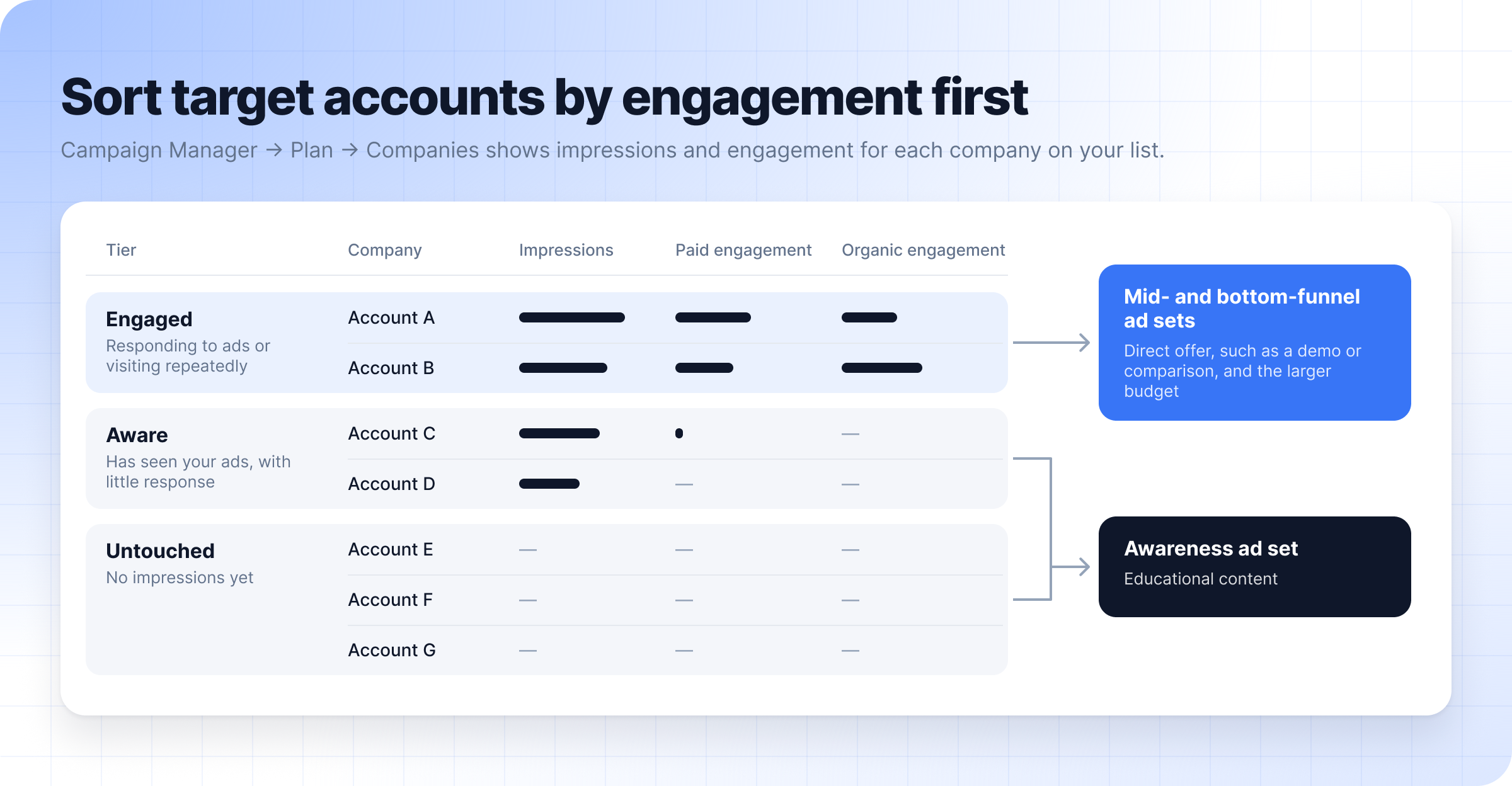
In Campaign Manager, open Plan, then Companies. It shows impressions, paid engagement and organic engagement per company, with an engagement level. Use it to sort your target list into three tiers:
Engaged: responding to ads or visiting repeatedly
Aware: has seen your ads, with little response
Untouched: no impressions yet
What to do in Campaign Manager: Move engaged accounts into middle and bottom-of-funnel ad sets, and keep untouched accounts in awareness. Save each tier as a list. Don’t wait for form fills to prove interest, because many engaged accounts never submit one. Reading engagement per account rather than per lead is the core of account-based intelligence.
3. Improves Buying Committee Coverage Within Priority Accounts
Several people across different roles shape a B2B purchase. If your ads reach only one role at a priority account, the rest of the committee never hears from you.
The Initiator spots the problem, often a manager in the function that feels it.
The Influencer shapes the shortlist: senior individual contributors and specialists.
The End User uses the product daily.
The Gatekeeper controls information and access.
The Decision-Maker signs off: director, VP or CXO in the owning function.
For each priority account, ask which roles have seen your ads.
What to do in Campaign Manager: Use one ad set per role, so reports show which roles are missing, and write creative for each. A B2B ABM strategy for LinkedIn Ads plans this across the whole target account list.
4. Makes Audience Exclusions as Important as Audience Inclusions
Keeping ads away from the wrong accounts matters as much as reaching the right ones, because every wasted impression comes out of your budget. These are the audiences to exclude:
Current customers, unless it’s an expansion campaign (source: CRM)
Accounts with open deals, where sales is already in the conversation (source: CRM)
Competitors (source: your own list)
Students, job seekers and unpaid seniority levels (source: LinkedIn attributes)
Companies your ads keep reaching that don’t fit (source: delivery data)
Refresh CRM-based lists regularly, or they go stale. Check two settings as well: Audience Expansion widens delivery beyond your targeting, and the LinkedIn Audience Network runs your ads on third-party apps and sites.
What to do in Campaign Manager: Upload customers, open deals and competitors as company lists and add them as exclusions in every ad set.
A predictive audience is only as good as the source it learns from. LinkedIn builds a new audience predicted to act like your source data, and each predictive audience uses one source: a contact list, company list, conversion, Lead Gen Form or retargeting audience. The source needs at least 300 members.
Here is how to choose the source:
Seed with the outcome you want more of: a closed-won or SQL list of accounts or contacts, or a qualified-lead conversion sent back through the LinkedIn Conversions API, rather than every form filler.
Exclude the seed list if you only want new accounts: people on the source list can still be included unless you exclude it.
Don’t count on Audience Expansion alongside it: it isn’t available in ad sets that use a predictive audience.
What to do in Campaign Manager: Build the predictive audience from your closed-won or SQL source, then add your seed list as an exclusion in the ad set.
Which B2B Audience Signals Should Influence Each LinkedIn Targeting Decision?
No single signal tells you everything about an account. This table pairs six common types of B2B audience data with the targeting decision each one supports and the weakness to plan around.
Audience Signal
What It Tells You
LinkedIn Targeting Decision
Limitation
Firmographic
Whether the company fits
Who goes on the target list
Fit isn’t interest
Technographic
What the company runs today
List for competitive or integration campaigns
LinkedIn can’t target it natively, so it arrives as a list
CRM Lifecycle
Where the account stands with you
Include, exclude or move to another funnel stage
Only as current as the last sync
Website Behavior
Which companies are researching you
Retargeting and prioritization
Identifies companies more reliably than people
LinkedIn Engagement
Who is responding to your ads
Tiering and bottom-funnel ad sets
An impression isn’t intent
Third-Party Intent
Research happening beyond your site
Early prioritization
Topic-level and probabilistic, so confirm with your own signals
Use B2B Audience Data to Refine LinkedIn Targeting
Audience data does its work before launch, in how you set up the campaign. Starting from a target account list (if you don’t have one yet, build a B2B target audience profile first), four steps get you to ad sets that are ready to run.
Prioritize accounts: Tier the target list by fit and by signal. Accounts that match your criteria and show buying signals go in the top tier, fit-only accounts in the next, and everything else stays in awareness.
Map signals to targeting: Decide which tier gets which ad set, offer and budget. Top-tier accounts get a direct offer and the larger share of spend, and lower tiers get educational content.
Set inclusions and exclusions: Load your company and contact lists as inclusions, add CRM exclusions for customers and open deals, and switch on the attribute exclusions you need. The upload steps are in our guide to LinkedIn custom audiences.
Activate: Upload lists early, because Matched Audiences can take up to 48 hours to build. A list also expires if it isn’t used in an active or draft campaign for 90 days, so attach it to an ad set as soon as it’s ready.
How Audience Data Creates a LinkedIn Targeting Feedback Loop
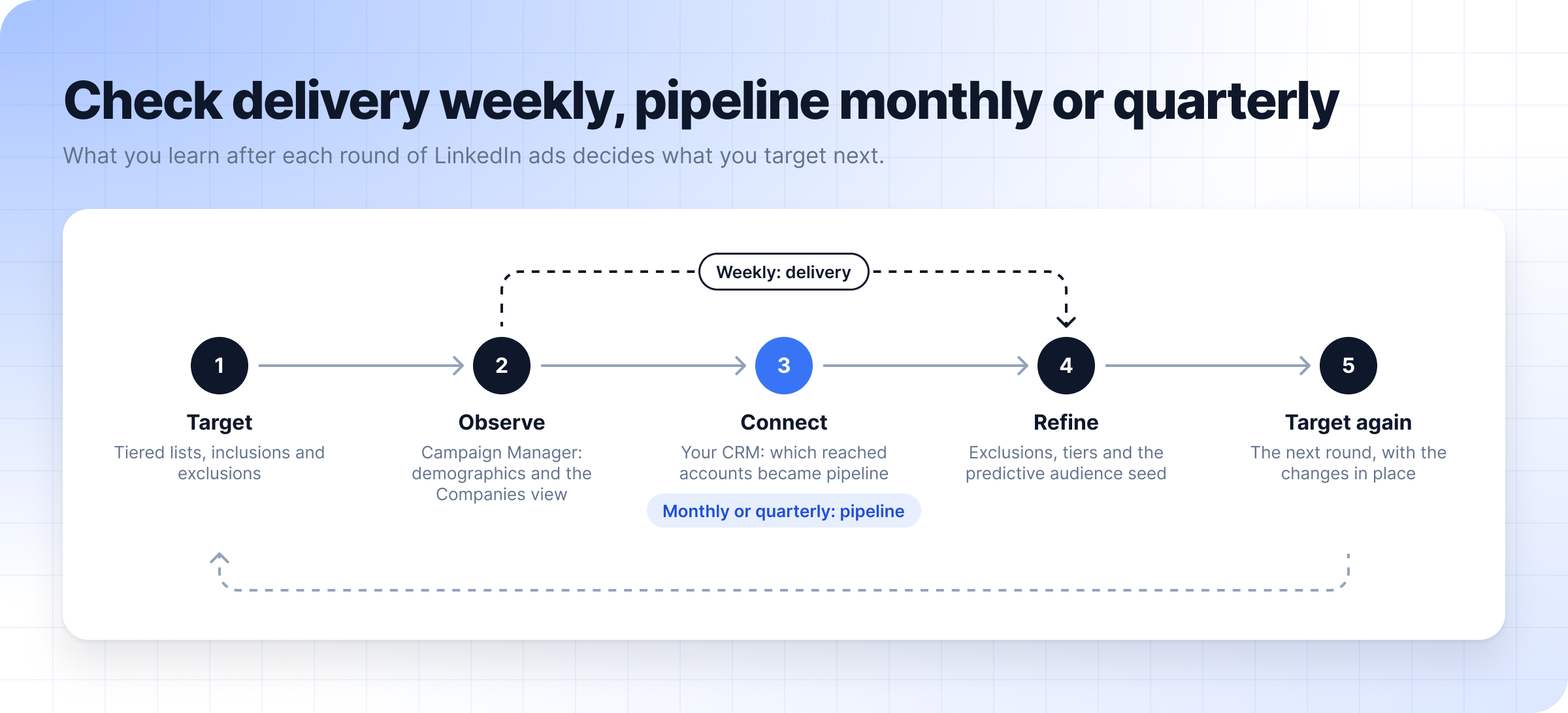
What you learn after the ads run decides what you target next. The loop has five steps:
Target: Run the audience you set up: the tiered lists, the inclusions and the exclusions.
Observe: Check who you actually reached. LinkedIn’s demographics reporting and the Companies view show which companies, job functions and seniorities saw your ads.
Connect: Read reach and engagement next to the CRM. Which reached accounts engaged, and which of those became pipeline? Campaign Manager shows the first half of that and the CRM shows the second, and neither shows both.
Refine: Tighten exclusions on companies that don’t fit, move engaged accounts down-funnel, and re-seed predictive audiences with fresh closed-won and SQL outcomes.
Target again: Launch the next round with the changes in place.
A workable rhythm is to check delivery weekly and pipeline monthly or quarterly, because deals take much longer to close than ads take to get clicked.
Measuring the Impact of Audience Data on LinkedIn Targeting
A campaign can hit its click goals while reaching the wrong companies, so measure who you reached as well as how the ads performed. These measures show whether the data improved who you reached:
Share of impressions that land on target accounts and target roles
Number of target accounts that moved from untouched to engaged
Buying committee coverage for each priority account
Pipeline and closed-won revenue by segment, not only by campaign
MQL-to-SQL rate by audience
Spend on companies you have since excluded
To see the effect of a change, compare results before and after the targeting change in the same ad set, or keep one ad set on the old targeting as a control and run the new targeting beside it. The same thinking applies when you measure account-based marketing as a whole, and LinkedIn pipeline attribution covers tying the results to revenue.
How DemandSense Turns Audience Signals Into Better LinkedIn Targeting Decisions
DemandSense is a platform for the marketer who runs LinkedIn Ads in a small B2B team. It puts three things in one place that usually live in three separate tools: attribution, optimization, and website visitor profiling. On top of that sits an MCP server.
Most audience data goes into LinkedIn, and what comes back is thin. Campaign Manager shows who you reached and the CRM shows what became pipeline, but the two don’t sit next to each other. DemandSense closes that loop:
See who you actually reached: DemandSense’s Audience Tuning shows the accounts, industries, company sizes, job titles, job functions and seniorities your budget reached, with clicks, impressions, conversions and conversion rate for each row. You can rate a row thumbs down and DemandSense takes that poor-fit segment out of delivery, across every campaign or inside one. Exclusions reach LinkedIn on a weekly sync.
See what became pipeline: DemandSense reads paid and organic LinkedIn engagement per account next to site visits and CRM deals. DemandSense’s Revenue Attribution then shows influenced pipeline and closed-won revenue by campaign, with breakdowns by industry, company size and country.
Decide who to prioritize next: DemandSense’s Rising Accounts panel lists accounts whose engagement is climbing this week, and its Opportunity Gap panel lists accounts with strong ad engagement and no CRM record. Both are panels you open in DemandSense, not alerts.
Keep audiences in step with the CRM: DemandSense’s Pipeline Sync adds accounts in active pipeline to LinkedIn audiences automatically, and DemandSense’s Spend Protection checks weekly for accounts whose deals have closed and stops your ads reaching them.
You can try all of this free for 30 days at demandsense.com, with no card needed.
FAQ
What B2B Audience Data Is Most Useful for Improving LinkedIn Ad Targeting?
Your own first-party data is the most useful for improving LinkedIn ad targeting: CRM outcomes such as closed-won deals, open deals and customers, plus website visits and LinkedIn engagement. Firmographics define who could buy, while first-party data shows who is closest to buying and who should never see the ad.
Can LinkedIn Ads Target Companies That Are Showing Buying Intent?
LinkedIn Ads can target companies that are showing buying intent, but only indirectly. Campaign Manager has no native intent filter, so intent arrives as an uploaded company list or through a connected data partner. You can also retarget accounts that engaged with your ads or site. Sales Navigator’s buyer intent signals sit in a separate product from Campaign Manager. Our guide to B2B intent data covers where intent signals come from.
How Does CRM Data Improve LinkedIn Ad Targeting?
CRM data improves LinkedIn ad targeting by supplying account status that LinkedIn doesn’t hold: customers, open deals and closed-won patterns. That status drives three things: exclusions, ad sets by funnel stage and the seed for predictive audiences. The setup is covered in LinkedIn Ads CRM integration.
Is First-Party or Third-Party Data Better for LinkedIn Targeting?
Use both first-party and third-party data, but for different tasks. First-party data is more accurate because it comes from your own pipeline and audience. Third-party data reaches accounts that haven’t found you yet. Widen the list with third-party data, then prioritize and exclude with first-party data.
Can Audience Data Improve Targeting Without Making a LinkedIn Audience Too Narrow?
Yes, as long as the data sets priorities and exclusions instead of adding more AND conditions. Keep each audience above LinkedIn’s 300-member minimum, put each tier in a separate ad set, and add reach with predictive audiences rather than loosening your filters.
Can Poor-Quality B2B Audience Data Make LinkedIn Targeting Worse?
Yes. Old CRM exports can exclude the wrong accounts or miss new customers, low match rates shrink audiences, and a weak seed list trains predictive audiences on the wrong people. Refresh lists and check who you reached. Lists also match fewer members in the EEA and Switzerland, where privacy rules limit who can be matched.
How Is B2B Audience Targeting Different From B2C Targeting?
B2B targets accounts and the roles inside them, with several people involved and long buying cycles. B2C targets individuals by demographics and interests. That is why company data, CRM status and buying committee coverage matter more on LinkedIn.
Share
Filed under
LinkedIn Ads
K
Written by
Kristina Haidai
Content Lead, DemandSense
Kristina is a journalist by training with seven years of writing for B2B companies and more than a hundred marketing pages behind her. She leads content at DemandSense and edits everything published on this blog.