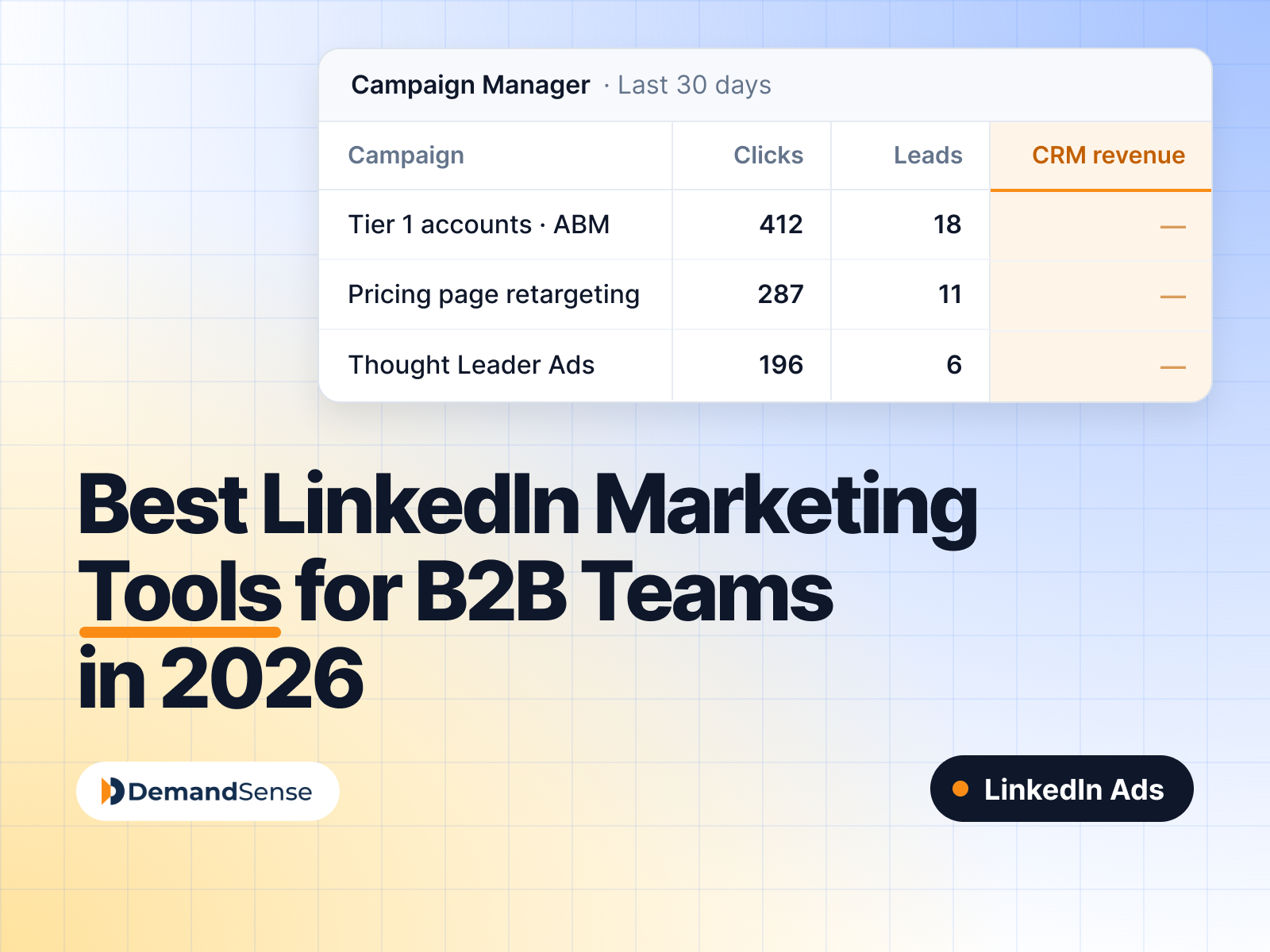
To measure LinkedIn Ads ROI, you need two numbers: the gross profit from deals LinkedIn influenced, and everything it cost to win them. ROI = (gross profit − total cost) ÷ total cost × 100. Campaign Manager gives you only part of the second number, the ad spend. The revenue sits in your CRM, and creative, tools and sales time are tracked somewhere else again.
Getting those numbers takes four things: conversion tracking, a link from ad engagement to CRM deals, a full cost base, and a time window that fits your sales cycle.
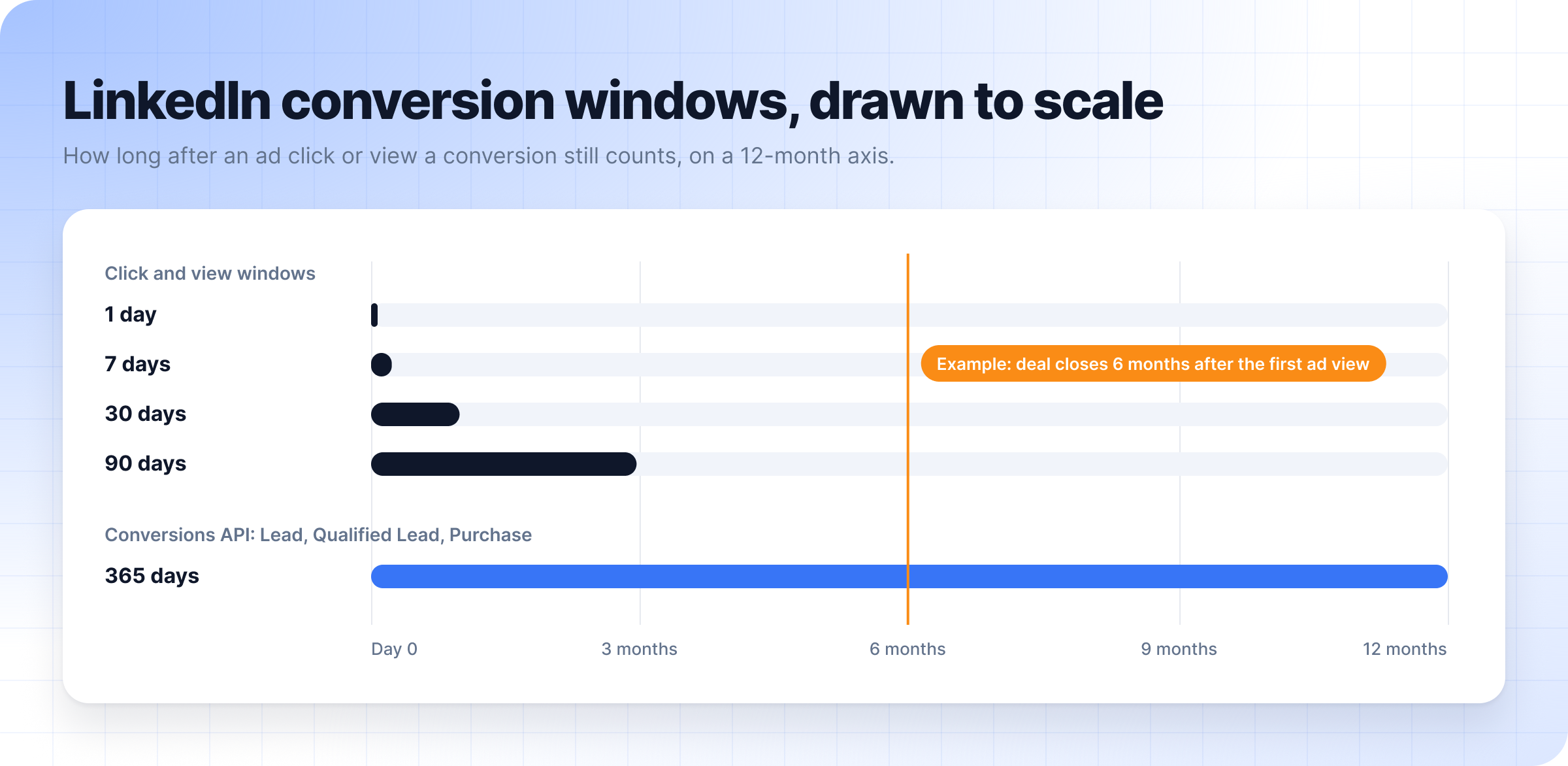
You can only measure ROI once deals close, and LinkedIn’s conversion windows are rarely long enough to cover a B2B sales cycle.
Nonetheless, attributed ROI is not proof that ads caused the sale.
What Does LinkedIn Ads ROI Actually Measure?
LinkedIn ads ROI measures the profit returned per dollar spent, using closed revenue, not leads or pipeline. It shows whether the amount you invested to close the deals was worth it.
ROI = (gross profit − total cost) ÷ total cost × 100 (where gross profit = revenue × margin).
It’s sometimes used interchangeably with LinkedIn ROAS, although they are different; ROAS measures the revenue generated from every ad dollar spent (revenue ROAS) or pipeline generated per ad spend (pipeline ROAS).
When to use each:
Metric
Formula
When to Use
Pipeline ROAS
Attributed pipeline value ÷ ad spend
Before deals close, to see if the campaigns are bringing in quality leads
Revenue ROAS
Closed revenue ÷ ad spend
When deciding which campaigns deserve more ad budget
ROI
(Gross profit − total cost) ÷ total cost × 100
To prove marketing value to leadership
If you lack profit data, report ROAS and label it ROAS, not ROI. The ROI vs. ROAS guide has the full comparison.
Step 1: What Do You Need to Track Before You Can Measure ROI?
LinkedIn recommends using them together: the Insight Tag tracks website visitors, and CAPI sends deals and CRM data back to LinkedIn, so campaigns can optimize toward those conversions.
Use this checklist:
Install the Insight Tag, connect CAPI, and then set up deduplication rules so that when both trackers send the same event ID, LinkedIn counts the conversion once.
Focus on the conversion events that matter: demo, qualified leads, opportunities.
Add UTMs on every ad so website sessions trace back to the right campaigns.
Keep campaign naming consistent across LinkedIn and your CRM for exports to align.
Step 2: How Do You Connect LinkedIn Ad Engagement to CRM Revenue?
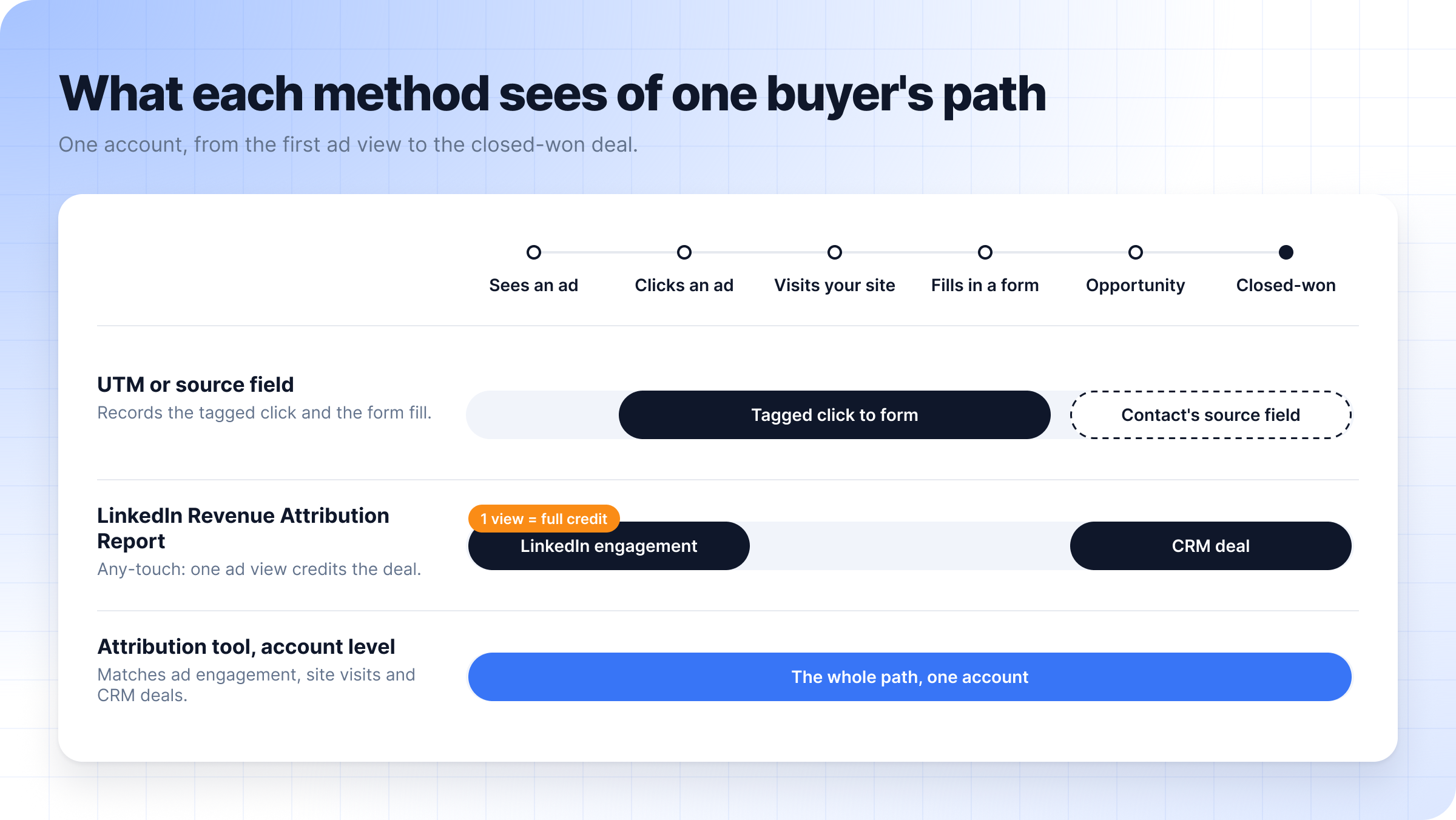
You can connect engagement to revenue in three ways: using UTM parameters, LinkedIn’s CRM sync, or an attribution tool.
Click-based conversions miss most of the B2B buyer journey because many B2B buyers see ads without ever clicking them. And view-through conversions credit LinkedIn for the influence even when there’s no proof of incrementality.
Linking ad engagement and CRM deals gives you a more complete picture.
Here’s what the three options give you:
1. UTM or Source Fields in the CRM
UTM parameters are tags you add to your landing page URL so when someone clicks on your ad and fills out the form on your website, LinkedIn is added to their CRM profile. Without UTM, or when you use inconsistent naming, clicks get logged as direct or organic, making your LinkedIn ads look like they are not working. So before campaigns go live, tag your landing pages and use consistent naming throughout for LinkedIn to get the credit it deserves.
Nonetheless, everything that happens after the form fill stays in your CRM, disconnected from LinkedIn, which still leaves you guessing. CRM sync closes that gap.
2. CRM Sync in Business Manager
If you are using HubSpot, Salesforce or Microsoft Dynamics 365 as your CRM, you can connect them directly to LinkedIn through Business Manager and access:
Revenue Attribution Report: which operates on an any-touch model and a lookback window of up to 365 days. You measure campaign influence through metrics like ROAS, revenue won, pipeline, win rate, average deal size and days to close. It also reports attribution at the company level, so you can see how target accounts move through the pipeline.
The main limitation is that the any-touch model overcredits LinkedIn; if a person views your ad even once, LinkedIn gets the credit, yet it barely influenced the deal.
3. Attribution Tool for Account-Level Matching
Attribution tools like DemandSense (the company behind this blog) connect all the data points, giving you a complete view of the buyer’s journey from start to close: ad engagement, website activity, account identification and matching, CRM opportunities and closed-won deals.
DemandSense connects natively to HubSpot, Attio, Zoho and Salesforce, and through webhooks for the other CRMs.
DemandSense revenue attribution lets you decide what counts as LinkedIn “influenced” on three presets (Awareness, Engagement and Intent) or your own thresholds, over a 3, 6 or 12-month lookback window. Keep sourced revenue (where LinkedIn was the first touchpoint) and influenced revenue (where the LinkedIn ads played a part in the buyer’s journey even though another channel created the deal) apart so the numbers are not inflated.
With DemandSense, closed-won deals and qualified opportunities go back to LinkedIn as conversions, once a day through the Conversions API. DemandSense also reports won ROAS, which measures LinkedIn ads revenue against ad spend and tells you whether the ad spend was worth it.
Since CRM and LinkedIn reports often cover different attribution windows and engagement thresholds, the numbers always differ. Keep LinkedIn-reported and CRM-reported numbers apart to avoid inflating revenue.
Step 3: Which Costs Belong in the ROI Calculation?
Every dollar spent on running campaigns and closing deals goes in. If you only count ad spend, you are calculating ROAS, not ROI.
The costs include:
Media spend
Creative and production (e.g., copywriter and designer fees)
Marketing tools like CRM costs
Agency or staff time (the ones who run and manage campaigns)
Sales time on ad-sourced leads
You also need gross margin to calculate profit ROI; gross profit (revenue × margin) is the money you actually keep from a deal.
What to include depends on what leadership asks; be consistent quarter to quarter, so reports are easily comparable.
Step 4: How Do You Calculate LinkedIn Ads ROI?
Here is a worked example showing how the costs included affect the number you get.
A B2B company spent (example figures, not benchmarks):
LinkedIn ad spend: $20,000
Other costs: $8,000
Closed-won revenue: $100,000
Gross margin: 70%
Gross profit: $100,000 × 70% = $70,000
ROAS
Revenue ÷ ad spend = $100,000 ÷ $20,000 = 5x ROAS
ROAS focuses on ad spend only and can sometimes lead to a negative ROI once deals close; read it alongside other pipeline metrics before making decisions.
ROI before other costs
(Gross profit − ad spend) ÷ ad spend × 100
ROI = ($70,000 − $20,000) ÷ $20,000 × 100 = 250%
ROI with all costs
(Gross profit − total cost) ÷ total cost × 100
ROI = ($70,000 − $28,000) ÷ $28,000 × 100 = 150%
This is the actual ROI because it incorporates all expenses.
Enter your own numbers to calculate your ROI. The calculator starts with the worked example above:
Step 5: Which Metrics Should You Watch, and When?
ROI is a lagging metric and only makes sense once deals close. In the meantime, you should check performance metrics for day-to-day campaign optimization decisions. For example:
Period
Metric
What It Answers
Weeks 1–2
Delivery and creative metrics: impressions, CTR, CPC
Are the ads reaching the target audience, and are they engaging?
Months 1–2
Demand and pipeline metrics: qualified leads, cost per qualified lead, opportunities, cost per opportunity
Are the ads bringing in quality leads the sales team can actually close?
Months 3+
Revenue metrics: closed-won revenue, CAC, ROAS, ROI
Are LinkedIn ads worth it?
Always match the window to your sales cycles for the reports. LinkedIn lets you select conversion windows: 1, 7, 30 or 90 days for clicks and for views. LinkedIn recommends 90-day click and 90-day view for lead and lower-funnel conversions. Purchase, Qualified Lead and Lead events sent through the Conversions API can use 365 days.
Also, report click-through and view-through conversions separately for you to see the campaigns that buyers are exposed to and the ones that get them to take immediate actions like clicks.
How Do You Know LinkedIn Ads Caused the Revenue?
Run an incrementality test to find incremental revenue.
LinkedIn offers Conversion Lift Testing in Campaign Manager, now at the campaign level. It splits your target audience into a test group that sees your ads and a control group that does not, and tracks conversions across both using your Insight Tag or Conversions API. You run the test for a minimum of 30 days (maximum 90 days), and if there are more conversions in the test group, then that’s proof that your ads are driving revenue.
However, the test needs a high minimum budget, so check LinkedIn’s current requirements before you plan one.
So if you have enough comparable accounts, run an account holdout test instead. Split your accounts into two groups, then target Group A on LinkedIn for 60 or 90 days (depending on your sales cycle) while holding Group B out. A LinkedIn company list needs at least 300 companies, so each group has to clear that.
Calculate incremental lift:
Incremental lift = Group A conversion rate − Group B conversion rate.
Attributed revenue is what a reporting method assigns to LinkedIn; incremental revenue is what would not have happened without the ads. Treat attributed ROI as an operating signal, not proof.
Step 6: How Do You Report LinkedIn Ads ROI to Leadership?
Lead with business outcomes: closed-won revenue, ROI, gross profit, pipeline, not impressions and CTR.
Break down the report into 5 sections:
The financial gain in the first sentence so they can see the ROI even if they don’t read the rest of the report.
Pipeline: direct deals from LinkedIn ads clicks to Lead Gen Form (the floor) plus the influenced deals that engaged with your LinkedIn ads before sales closed them (the ceiling). Showing both keeps the report realistic.
Lead quality: compare LinkedIn-influenced deals vs. the ones that LinkedIn did not touch in terms of win rate and how long it takes to close each. If LinkedIn-influenced deals close faster, that’s a big win.
Efficiency: show how much you spent on ads and how much revenue was generated. This is the answer to, “LinkedIn ads are expensive, why can’t we market on other cheaper platforms like Meta instead?”
Action plan: the campaigns that worked, the ones that flopped, and what you are doing to improve performance. Also, what’s maturing: the open deals in pipeline expected to close.
Here are the metrics for each section:
Section
Key Metrics
Financial gain
Closed-won revenue, gross profit, ROI
Pipeline
Closed-won deals (sourced and influenced), open pipeline (value estimates)
Lead quality
SQLs, win rate, conversion rate
Efficiency
CAC, won ROAS, cost per opportunity
Action plan
Delivery metrics: CTR, CPC
Add a brief explanation of how you calculated ROI: the costs included and the attribution window you used.
To measure LinkedIn ads ROI, you only need four things: reliable tracking for conversions, a link between ad engagement and CRM deals, a full cost base, and a suitable attribution window. You already have the data; it’s just scattered across systems.
Simply connect your engagement data, website activity, and CRM so you can track conversions and see how much your LinkedIn ads influence deals.
DemandSense makes that connection and gives you the whole path on one timeline: LinkedIn touches, website sessions, the pages they read, and the deal. Plus the metrics you need to report on LinkedIn ads ROI even in the earlier campaign days, when deals haven’t closed yet.
It depends on your gross margin, other costs, and sales cycle. Work out the break-even ROAS (1 ÷ gross margin) and compare. Your ROAS should sit above the baseline enough to cover the other costs outside your media spend: tools, creative, sales time.
What Is a Good ROI for LinkedIn Ads?
There is no universal benchmark; compare against your other channels and your CAC payback period. As long as the campaigns bring in enough revenue to cover costs and you still remain with a profitable ROI, then the campaigns are doing what they’re meant to do.
How Long Does It Take to See ROI from LinkedIn Ads?
You can calculate ROI only once deals close, which for most B2B sales cycles means month three or later. Until then, watch delivery metrics such as CTR and CPC in weeks 1–2, and pipeline metrics such as qualified leads and cost per opportunity in months 1–2.
Can You Measure LinkedIn Ads ROI Without an Attribution Tool?
Yes. UTMs on every ad, a CRM source field and LinkedIn’s Revenue Attribution Report (if your CRM is HubSpot, Salesforce or Microsoft Dynamics 365) give you a working ROI number. What you lose is the account-level view: buyers who saw your ads but never clicked stay invisible to UTMs, and the any-touch model overcredits LinkedIn.
Why Don’t LinkedIn and CRM Revenue Numbers Match?
They use different attribution windows and engagement thresholds. LinkedIn counts a conversion inside its click or view window, while your CRM credits the source recorded on the contact or deal. Report the two side by side, never add them together, and say which one your ROI figure uses.
Share
Filed under
LinkedIn AdsRevenue Attribution & Measurement
I
Written by
Iurii Znak
President, DemandSense
Iurii is an entrepreneur with 15 years of experience. Ten of those years went into building a LinkedIn marketing agency into a leader in B2B lead generation: a Clutch Global Award winner and a top lead generation agency on Clutch, with 300+ clients, and acquired in 2024. He now runs DemandSense, the ultimate platform for LinkedIn Ads, bringing attribution, optimization and visitor intelligence into one place.